Template Types#
- class pywa.types.templates.Template#
Represents a New WhatsApp Template.
Read more at developers.facebook.com.
Example:
from pywa.types.templates import *

my_template = Template(
    name="my_template",
    language=TemplateLanguage.ENGLISH_US,
    category=TemplateCategory.MARKETING,
    components=[
        HeaderText(text="Welcome to our service!"),
        BodyText(text="Hello {{name}}, thank you for joining us!", name="John"),
        FooterText(text="Best regards, The Team"),
        Buttons(
            buttons=[
                QuickReplyButton(text="Get Started"),
                URLButton(text="Visit Website", url="https://website.com?ref={{1}}")
            ]
        )
    ],
    parameter_format=ParamFormat.NAMED,
)

auth_template = Template(
    name="auth_template",
    language=TemplateLanguage.ENGLISH_US,
    category=TemplateCategory.AUTHENTICATION,
    components=[
        AuthenticationBody(add_security_recommendation=True),
        AuthenticationFooter(code_expiration_minutes=5),
        Buttons(
            buttons=[
                OneTapOTPButton(
                    text="Autofill Code",
                    autofill_text="Autofill",
                    supported_apps=[
                        OTPSupportedApp(
                            package_name="com.example.myapp",
                            signature_hash="12345678901"
                        )
                    ]
                ),
            ]
        )
    ],
)
- Variables:
name (str) – The name of the template (should be unique, maximum 512 characters).
language (pywa.types.templates.TemplateLanguage) – The language of the template (See Supported Languages).
category (pywa.types.templates.TemplateCategory) – The category of the template (See Template Categorization).
components (list[pywa.types.templates.TemplateBaseComponent | dict]) – Components that make up the template. Header, BodyText, FooterText, Buttons, Cards, etc. (See Template Components).
parameter_format (pywa.types.templates.ParamFormat | None) – The type of parameter formatting the
HeaderTextandBodyTextcomponents of the template will use. Defaults toPOSITIONAL.message_send_ttl_seconds (int | None) – The time-to-live (TTL) for the template message in seconds. (See Time-to-live (TTL)).
- get_component(comp_type)#
Get a component of the specified type from the template.
If the template has multiple components of the specified type (e.g. a button or a carousel), this property will return the first component found.
Use
get_components()to get all components of a specified type.
>>> t = Template(...)
>>> body = t.get_component(BodyText)
>>> if body: print(body.text, body.example)
- Parameters:
comp_type (type[_T]) – The type of component to retrieve.
- Returns:
The component of the specified type if it exists, otherwise None.
- Return type:
_T | None
- get_components(comp_type)#
Get all components of the specified type from the template.
This method will search for components of the specified type at all levels of the template, including within carousels and buttons.
Use
get_component()to get the first component of a specified type.
>>> t = Template(...)
>>> quick_replays = t.get_components(QuickReplyButton)
>>> for q in quick_replays: print(q.text)
- validate_params(params)#
Validate the provided parameters against the template’s components.
- Parameters:
params (list[BaseParams] | None) – A list of BaseParams instances representing the parameters to validate.
- Raises:
ValueError – If there are missing or extra parameters for the template’s components.
- Return type:
NoReturn | None
- class pywa.types.templates.TemplateDetails#
Represents the details of an existing WhatsApp Template.
- Variables:
id (str) – The unique identifier of the template.
name (str) – The name of the template.
status (TemplateStatus) – The status of the template (See Template Status).
category (TemplateCategory) –
The category of the template (See Template Categorization).
language (TemplateLanguage) –
The language of the template (See Supported Languages).
components (list[TemplateBaseComponent | dict]) –
Components that make up the template. Header, Body, Footer, Buttons, Cards, etc. (See Template Components).
parameter_format (ParamFormat | None) – The type of parameter formatting the Header and BodyText components of the template will use.
message_send_ttl_seconds (int | None) –
The time-to-live (TTL) for the template message in seconds (See Time-to-live (TTL)).
correct_category (TemplateCategory | None) – The correct category of the template, if applicable.
previous_category (TemplateCategory | None) – The previous category of the template, if applicable.
rejected_reason (TemplateRejectionReason | None) – The reason the message template was rejected, if applicable (See Template Rejected Status).
library_template_name (str | None) – Template Library name that this template is cloned from, if applicable.
quality_score (QualityScore | None) – The quality score of the template, if applicable (See Template Quality Score).
cta_url_link_tracking_opted_out (bool | None) – Optional boolean field for opting out/in of link tracking at template level.
sub_category (str | None) – The sub-category of the template, if applicable.
- delete()#
Delete this template
If you delete a template that has been sent in a template message but has yet to be delivered (e.g. because the customer’s phone is turned off), the template’s status will be set to
PENDING_DELETIONand we will attempt to deliver the message for 30 days. After this time you will receive a “Structure Unavailable” error and the customer will not receive the message.Names of an approved template that has been deleted cannot be used again for 30 days.
- Return type:
- update(*, new_category=None, new_components=None, new_message_send_ttl_seconds=None, new_parameter_format=None)#
Update this template.
Only templates with an
APPROVED,REJECTED, orPAUSEDstatus can be edited.You cannot edit the category of an approved template.
Approved templates can be edited up to 10 times in a 30 day window, or 1 time in a 24 hour window. Rejected or paused templates can be edited an unlimited number of times.
After editing an approved or paused template, it will automatically be approved unless it fails template review.
Read more at developers.facebook.com.
- Parameters:
new_category (TemplateCategory | None) – The new category of the template (optional, cannot be changed for approved templates).
new_components (list[TemplateBaseComponent] | None) – The new components of the template (optional, if not provided, the existing components will be used).
new_message_send_ttl_seconds (int | None) – The new message send TTL in seconds (optional, if not provided, the existing TTL will be used).
new_parameter_format (ParamFormat | None) – The new parameter format (optional, if not provided, the existing format will be used).
- Returns:
Whether the template was updated successfully.
- Return type:
- duplicate(*, target_waba_id=None, **overrides)#
Duplicate this template.
WhatsApp Cloud API does not support duplicating templates, this method creates a new template with the same components and properties as this one. It is useful for creating variations of existing templates with minor changes.
Example
>>> wa = WhatsApp(...)
>>> template = wa.get_template("123456789")
>>> new_template = template.duplicate(language=TemplateLanguage.FRENCH)
- Parameters:
overrides – Optional overrides for the template properties (e.g. name, language, category, components, etc.) to be applied to the new template. If not provided, the new template will have the same properties as this one.
target_waba_id (str | None) – The ID of the WhatsApp Business Account to create the new template in. If not provided, the client’s
waba_idwill be used.
- Return type:
- compare(*to, start, end)#
You can compare two templates by examining how often each one is sent, which one has the lower ratio of blocks to sends, and each template’s top reason for being blocked.
Only two templates can be compared at a time.
Both templates must be in the same WhatsApp Business Account.
Templates must have been sent at least 1,000 times in the queries specified timeframe.
Timeframes are limited to
7,30,60and90day lookbacks from the time of the request.Read more at developers.facebook.com.
- Parameters:
- Returns:
A TemplatesCompareResult object containing the comparison results.
- Return type:
- unpause()#
Unpause a template that has been paused due to pacing.
This method can only be called if the template is currently paused due to pacing.
You must wait 5 minutes after a template has been paused as a result of pacing before calling this method.
Read more at developers.facebook.com.
- Returns:
A TemplateUnpauseResult object containing the result of the unpause operation.
- Return type:
- send(to, params, *, validate=True, use_mm_lite_api=False, message_activity_sharing=None, reply_to_message_id=None, tracker=None, sender=None)#
A shortcut to send a template message to WhatsApp users.
- Parameters:
params (list[BaseParams]) – The parameters to fill in the template.
validate (bool) – Whether to validate the parameters against the template’s components before sending (optional, default: True).
use_mm_lite_api (bool) – Whether to use Marketing Messages Lite API (optional, default: False).
message_activity_sharing (bool | None) – Whether to share message activities (e.g. message read) for that specific marketing message to Meta to help optimize marketing messages (optional, only if
use_mm_lite_apiis True).reply_to_message_id (str | None) – The ID of the message to reply to (optional).
tracker (str | CallbackData | None) – A callback data to track the message (optional, can be a string or a
CallbackDataobject).sender (str | int | None) – The phone ID to send the template from (optional, if not provided, the client’s phone ID will be used).
- Return type:
- get_component(comp_type)#
Get a component of the specified type from the template.
If the template has multiple components of the specified type (e.g. a button or a carousel), this property will return the first component found.
Use
get_components()to get all components of a specified type.
>>> t = Template(...)
>>> body = t.get_component(BodyText)
>>> if body: print(body.text, body.example)
- Parameters:
comp_type (type[_T]) – The type of component to retrieve.
- Returns:
The component of the specified type if it exists, otherwise None.
- Return type:
_T | None
- get_components(comp_type)#
Get all components of the specified type from the template.
This method will search for components of the specified type at all levels of the template, including within carousels and buttons.
Use
get_component()to get the first component of a specified type.
>>> t = Template(...)
>>> quick_replays = t.get_components(QuickReplyButton)
>>> for q in quick_replays: print(q.text)
- validate_params(params)#
Validate the provided parameters against the template’s components.
- Parameters:
params (list[BaseParams] | None) – A list of BaseParams instances representing the parameters to validate.
- Raises:
ValueError – If there are missing or extra parameters for the template’s components.
- Return type:
NoReturn | None
- class pywa.types.templates.TemplateStatus#
The status of the template.
‘Template status’ on developers.facebook.com
- Variables:
APPROVED – Indicates the template has been approved and can now be sent in template messages.
DISABLED – Indicates the template has been disabled due to user feedback.
DELETED – Indicates the template has been deleted.
IN_APPEAL – Indicates the template is in the appeal process.
PENDING – Indicates the template is undergoing template review.
REINSTATED – Indicates the template is no longer flagged or disabled and can be sent in template messages again.
REJECTED –
Indicates the template has been rejected. You can
update()the template to have it undergo template review again or appeal the rejection.PENDING_DELETION – Indicates template has been deleted via WhatsApp Manager.
FLAGGED – Indicates the template has received negative feedback and is at risk of being disabled.
PAUSED – Indicates the template has been paused.
ARCHIVED – Indicates the template has been archived due to inactivity. Archived templates are scheduled for deletion after 28 days unless unarchived.
UNARCHIVED – Indicates the template has been unarchived and restored to its previous status.
LIMIT_EXCEEDED – Indicates the WhatsApp Business Account template is at its template limit.
LOCKED – Indicates the template has been locked and cannot be edited.
UNKNOWN – The status of the template is unknown.
- class pywa.types.templates.QualityScore#
Represents the quality score of a template.
- Variables:
score (pywa.types.templates.QualityScoreType) – The quality score type (
GREEN,YELLOW,RED).date (datetime.datetime) – The date when the score was last updated.
- class pywa.types.templates.LibraryTemplate#
Template Library makes it faster and easier for businesses to create utility templates for common use cases, like payment reminders, delivery updates — and authentication templates for common identity verification use cases.
These pre-written templates have already been categorized as utility or authentication. Library templates contain fixed content that cannot be edited and parameters you can adapt for business or user-specific information.
Read more at developers.facebook.com.
Browse the available templates at business.facebook.com.
- Variables:
name (str) – The name of the template.
library_template_name (str) – The exact name of the Template Library template.
category (pywa.types.templates.TemplateCategory) – The category of the template.
language (pywa.types.templates.TemplateLanguage) – The language of the template.
library_template_body_inputs (list[pywa.types.templates.BaseLibraryBodyInput] | None) – Optional inputs for the body of the template.
library_template_button_inputs (list[pywa.types.templates.BaseLibraryButtonInput] | None) – Optional inputs for the buttons of the template.
- class pywa.types.templates.TemplateCategory#
Template category.
‘Template Categorization’ on developers.facebook.com
- Variables:
AUTHENTICATION – Enable businesses to verify a user’s identity, potentially at various steps of the customer journey. See Authentication templates for more details.
MARKETING – Enable businesses to achieve a wide range of goals, from generating awareness to driving sales and retargeting customers. See Marketing templates for more details.
UTILITY – Enable businesses to follow up on user actions or requests, since these messages are typically triggered by user actions. See Utility templates for more details.
- class pywa.types.templates.TemplateLanguage#
Template language and locale code.
‘Template language and locale code’ on developers.facebook.com
- class pywa.types.templates.ParamFormat#
The type of parameter formatting the HEADER and BODY components of the template will use.
- Variables:
POSITIONAL – The component uses positional parameters, e.g.
{{1}},{{2}}, etc.NAMED – The component uses named parameters, e.g.
{{param_name}}.
- class pywa.types.templates.HeaderText#
Represents a header text component in a template.
All templates are limited to one header component
Read more at developers.facebook.com.
Example
>>> header_text = HeaderText("Hi {{name}}! How are you? Get {{discount}}% OFF!", name="John", discount=15)
>>> header_text.params(name="David", discount=20)
>>> header_text = HeaderText("Hi {{1}}! How are you? Get {{2}}% OFF!", "John", 15)
>>> header_text.params("David", 20)
>>> print(header_text.preview())
- params(**named)#
Fill the parameters for the header text component.
- Parameters:
*positionals – Positional parameters to fill in the template text. e.g. for “Hi {{1}}!”, you would pass
"John"as the first positional argument.**named – Named parameters to fill in the template text. e.g. for “Hi {{name}}!”, you would pass
name="John"as a named argument.
- Return type:
_Params
- property param_names: tuple[str, ...]#
Returns the names of the parameters required by this component, if the component uses named parameters.
This property is primarily intended for introspection and automation, allowing to dynamically discover which parameters must be provided when calling
params().See also
get_component()andget_components().
Example
>>> temp = Template(
...     components=[
...         BodyText(
...             text="Hi {{name}}, your flight {{flight_iata}} is delayed",
...             name="John",
...             flight_iata="AA123",
...         )
...     ]
... )
>>> body = temp.get_component(BodyText) # get the body component of the template
>>> body.param_names
('name', 'flight_iata')
>>> wa.send_template(
...     params=[body.params(**{name: my_get_value(name) for name in body.param_names})]
... )
- Returns:
A tuple of parameter names if the component uses named parameters, otherwise raises a ValueError.
- Raises:
ValueError – If the component does not use named parameters.
- preview(*override_positionals, **override_named)#
Returns a preview of the template text with examples filled in.
- Parameters:
*override_positionals – Positional arguments to override the example values (no need to provide all).
**override_named – Named arguments to override the example values (no need to provide all).
- Return type:
- validate(*positionals, **named)#
Validates the provided parameters against the component’s expected parameters.
- Parameters:
*positionals – Positional parameters to validate.
**named – Named parameters to validate.
- Raises:
ValueError – If the provided parameters do not match the expected parameters.
- Return type:
NoReturn | None
- class pywa.types.templates.HeaderImage#
Represents a header image component in a template.
All templates are limited to one header component.
Read more at developers.facebook.com.
Example
>>> header_image = HeaderImage(example="https://example.com/image.jpg")
>>> header_image.params(image="https://cdn.com/image.jpg")
- Variables:
example – An example of the header image media.
mime_type – The mime type of the example (optional, required when passing bytes, bytes generator, or path without extension).
- static params(*, image, mime_type=None)#
Fill the parameters for the header image component.
- Parameters:
image (str | int | Media | Path | bytes | BinaryIO | Iterator[bytes] | AsyncIterator[bytes]) – The image media to be used in the header (can be a URL, file path, bytes, bytes generator, file-like object, base64 or a
Mediainstance).mime_type (str | None) – The mime type of the image (optional, required when passing bytes, bytes generator, or path without extension).
- Returns:
An instance of BaseParams containing the media parameter.
- Return type:
_Params
- class pywa.types.templates.HeaderVideo#
Represents a header video component in a template.
All templates are limited to one header component.
Read more at developers.facebook.com.
Example
>>> header_video = HeaderVideo(example="https://example.com/video.mp4")
>>> header_video.params(video="https://cdn.com/video.mp4")
- Variables:
example – An example of the header video media.
mime_type – The mime type of the example (optional, required when passing bytes, bytes generator, or path without extension).
- static params(*, video, mime_type=None)#
Fill the parameters for the header video component.
- Parameters:
video (str | int | Media | Path | bytes | BinaryIO | Iterator[bytes] | AsyncIterator[bytes]) – The video media to be used in the header (can be a URL, file path, bytes, bytes generator, file-like object, base64 or a
Mediainstance).mime_type (str | None) – The mime type of the image (optional, required when passing bytes, bytes generator, or path without extension).
- Returns:
An instance of BaseParams containing the media parameter.
- Return type:
_Params
- class pywa.types.templates.HeaderDocument#
Represents a header document component in a template.
All templates are limited to one header component.
Read more at developers.facebook.com.
Example
>>> header_document = HeaderDocument(example="https://example.com/document.pdf")
>>> header_document.params(document="https://cdn.com/document.pdf")
- Variables:
example – An example of the header document media.
mime_type – The mime type of the example (optional, required when passing bytes, bytes generator, or path without extension).
- static params(*, document, filename=<object object>, mime_type=None)#
Fill the parameters for the header document component.
- Parameters:
document (str | int | Media | Path | bytes | BinaryIO | Iterator[bytes] | AsyncIterator[bytes]) – The document media to be used in the header (can be a URL, file path, bytes, bytes generator, file-like object, base64 or a
Mediainstance).filename (str | None) – Document filename, with extension. The WhatsApp client will use an appropriate file type icon based on the extension (Optional, if not provided, if possible, the filename will be extracted from the URL or file path. pass
Noneto skip this behavior).mime_type (str | None) – The mime type of the image (optional, required when passing bytes, bytes generator, or path without extension).
- Returns:
An instance of BaseParams containing the media parameter.
- Return type:
_Params
- class pywa.types.templates.HeaderGIF#
Represents a header GIF component in a template.
All templates are limited to one header component.
GIFs are currently only available for the MM Lite API.
Max size: 3.5MB. Larger files will be displayed as video messages.
Read more at developers.facebook.com.
Example
>>> header_gif = HeaderGIF(example="https://example.com/animation.gif")
>>> header_gif.params(gif="https://cdn.com/animation.gif")
- Variables:
example – An example of the header GIF media.
mime_type – The mime type of the example (optional, required when passing bytes, bytes generator, or path without extension).
- static params(*, gif, mime_type=None)#
Fill the parameters for the header GIF component.
- Parameters:
gif (str | int | Media | Path | bytes | BinaryIO | Iterator[bytes] | AsyncIterator[bytes]) – The GIF media to be used in the header (can be a URL, file path, bytes, bytes generator, file-like object, base64 or a
Mediainstance).mime_type (str | None) – The mime type of the image (optional, required when passing bytes, bytes generator, or path without extension).
- Returns:
An instance of BaseParams containing the media parameter.
- Return type:
_Params
- class pywa.types.templates.HeaderLocation#
Represents a header location component in a template.
All templates are limited to one header component.
Read more at developers.facebook.com.
Example
>>> header_location = HeaderLocation()
>>> header_location.params(lat=37.7749, lon=-122.4194, name="San Francisco", address="California, USA")
- static params(*, lat, lon, name, address)#
Fill the parameters for the header location component.
- Parameters:
- Returns:
An instance of BaseParams containing the location parameters.
- Return type:
_Params
- class pywa.types.templates.HeaderProduct#
Represents a header product component in a template.
All templates are limited to one header component.
Read more at developers.facebook.com.
Example
>>> header_product = HeaderProduct()
>>> header_product.params(catalog_id="1234567890", sku="SKU12345")
- static params(*, catalog_id, sku)#
Fill the parameters for the header product component.
- Parameters:
catalog_id (str) – ID of connected ecommerce catalog containing the product.
sku (str) – Unique identifier of the product in a catalog (also referred to as
Content IDorRetailer ID).
- Returns:
An instance of BaseParams containing the catalog ID and SKU.
- Return type:
_Params
- class pywa.types.templates.BodyText#
The body component represents the core text of your message template and is a text-only template component. It is required for all templates.
All templates are limited to one body component.
Read more at developers.facebook.com.
Example
>>> body_text = BodyText("Hi {{name}}! How are you? Get {{discount}}% OFF!", name="John", discount=15)
>>> body_text.params(name="David", discount=20)
>>> body_text = BodyText("Hi {{1}}! How are you? Get {{2}}% OFF!", "John", 15)
>>> body_text.params("David", 20)
>>> print(body_text.preview())
- params(**named)#
Fill the parameters for the body text component.
- Parameters:
*positionals – Positional parameters to fill in the template text. e.g. for “Hi {{1}}!”, you would pass
"John"as the first positional argument.**named – Named parameters to fill in the template text. e.g. for “Hi {{name}}!”, you would pass
name="John"as a named argument.
- Return type:
_Params
- static library_input(*, add_track_package_link=None, add_learn_more_link=None)#
Fill the library input for the body text component.
- property param_names: tuple[str, ...]#
Returns the names of the parameters required by this component, if the component uses named parameters.
This property is primarily intended for introspection and automation, allowing to dynamically discover which parameters must be provided when calling
params().See also
get_component()andget_components().
Example
>>> temp = Template(
...     components=[
...         BodyText(
...             text="Hi {{name}}, your flight {{flight_iata}} is delayed",
...             name="John",
...             flight_iata="AA123",
...         )
...     ]
... )
>>> body = temp.get_component(BodyText) # get the body component of the template
>>> body.param_names
('name', 'flight_iata')
>>> wa.send_template(
...     params=[body.params(**{name: my_get_value(name) for name in body.param_names})]
... )
- Returns:
A tuple of parameter names if the component uses named parameters, otherwise raises a ValueError.
- Raises:
ValueError – If the component does not use named parameters.
- preview(*override_positionals, **override_named)#
Returns a preview of the template text with examples filled in.
- Parameters:
*override_positionals – Positional arguments to override the example values (no need to provide all).
**override_named – Named arguments to override the example values (no need to provide all).
- Return type:
- validate(*positionals, **named)#
Validates the provided parameters against the component’s expected parameters.
- Parameters:
*positionals – Positional parameters to validate.
**named – Named parameters to validate.
- Raises:
ValueError – If the provided parameters do not match the expected parameters.
- Return type:
NoReturn | None
- class pywa.types.templates.DateTime#
Represents a date and time parameter for a text component in a template.
- Variables:
fallback_value (str) – A human-readable date string to display to the user, e.g., August 5, 2025.
- class pywa.types.templates.Currency#
Represents a currency parameter for a text component in a template.
Footers are optional text-only components that appear immediately after the body component. Templates are limited to one footer component.
Read more at developers.facebook.com.
Example
>>> footer = FooterText(text="Thank you for using our service!")
- Variables:
text (str) – The footer text. 60 characters maximum.
- class pywa.types.templates.Buttons#
Buttons are optional interactive components that perform specific actions when tapped. Templates can have a mixture of up to 10 button components total, although there are limits to individual buttons of the same type as well as combination limits. These limits are described below.
If a template has more than three buttons, two buttons will appear in the delivered message and the remaining buttons will be replaced with a See all options button. Tapping the See all options button reveals the remaining buttons.
Read more at developers.facebook.com.
Example
>>> button1 = CopyCodeButton(example="SAVE20")
>>> button2 = PhoneNumberButton(text="Call Us", phone_number="+1234567890")
>>> button3 = URLButton(text="Visit Website", url="https://website.com")
>>> buttons = Buttons(buttons=[button1, button2, button3])
- class pywa.types.templates.CopyCodeButton#
Copy code buttons copy a text string (defined when the template is sent in a template message) to the device’s clipboard when tapped by the app user.
Templates are limited to one copy code button.
Read more at developers.facebook.com.
Example
>>> copy_code_button = CopyCodeButton(example="SAVE20")
>>> copy_code_button.params(coupon_code="SAVE20", index=0)
- Variables:
example (str) – String to be copied to device’s clipboard when tapped by the app user. Maximum 15 characters.
- static params(*, coupon_code, index)#
Fill the parameters for the copy code button component.
- Parameters:
coupon_code (str) – The coupon code to be copied when the customer taps the button. Only accepting alphanumeric characters.
index (int) – Indicates order in which button should appear, if the template uses multiple buttons. Buttons are zero-indexed, so setting value to 0 will cause the button to appear first, and another button with an index of 1 will appear next, etc.
- Returns:
An instance of BaseParams containing the coupon code and index.
- Return type:
_Params
- class pywa.types.templates.FlowButton#
Flows buttons are for sending Flows Messages as templates.
Flows can quickly be built in the playground and attached as JSON, or an existing Flow ID can be specified.
Read more at developers.facebook.com.
Example
>>> flow_button = FlowButton(
...     text="Start Flow",
...     flow_id="1234567890",
...     flow_action=FlowActionType.NAVIGATE,
...     navigate_screen="entry_screen_id",
...     icon=FlowButtonIcon.DOCUMENT
... )
>>> flow_button.params(index=0, flow_token="example_token", flow_action_data={"key": "value"})
- Variables:
text (str) – Button label text. 25 characters maximum.
flow_id (str | None) – Unique identifier of the Flow provided by WhatsApp. The Flow must be published. Cannot be used with
flow_nameorflow_json.flow_name (str | None) – The name of the Flow. Supported in Cloud API only. The Flow ID is stored in the message template, not the name, so changing the Flow name will not affect existing message templates. The Flow must be published. Cannot be used with
flow_idorflow_json.flow_json (pywa.types.flows.FlowJSON | dict | str | pathlib.Path | bytes | BinaryIO | None) – The JSON representation of the Flow. Cannot be used with
flow_idorflow_name.flow_action (Literal[pywa.types.flows.FlowActionType.DATA_EXCHANGE, pywa.types.flows.FlowActionType.NAVIGATE] | None) – navigate or data_exchange. Use
NAVIGATEto predefine the first screen as part of the template message. UseDATA_EXCHANGEfor advanced use-cases where the first screen is provided by your endpoint. Defaults toNAVIGATE.navigate_screen (str | None) – Optional only if
flow_actionisNAVIGATE. The id of the entry screen of the Flow. Defaults to the first screen of the Flow.icon (pywa.types.templates.FlowButtonIcon | None) – Optional icon for the button.
- static params(*, index, flow_token=None, flow_action_data=None)#
Fill the parameters for the Flow button component.
- Parameters:
index (int) – Indicates order in which button should appear, if the template uses multiple buttons. Buttons are zero-indexed, so setting value to 0 will cause the button to appear first, and another button with an index of 1 will appear next, etc.
flow_token (str | None) – Optional token to be passed to the Flow.
flow_action_data (dict | None) – Optional data to be passed to the first screen.
- Returns:
An instance of BaseParams containing the parameters for the Flow button.
- Return type:
_Params
- class pywa.types.templates.FlowButtonIcon#
The icon for the Flow button.
- Variables:
DOCUMENT – Icon for document flows.
PROMOTION – Icon for promotion flows.
REVIEW – Icon for review flows.
- class pywa.types.templates.PhoneNumberButton#
Phone number buttons call the specified business phone number when tapped by the app user. Templates are limited to one phone number button.
Note that some countries have special phone numbers that have leading zeros after the country calling code (e.g.,
+55-0-955-585-95436). If you assign one of these numbers to the button, the leading zero will be stripped from the number. If your number will not work without the leading zero, assign an alternate number to the button, or add the number as message body text.Read more at developers.facebook.com.
Example
>>> phone_button = PhoneNumberButton(text="Call Us", phone_number="+1234567890")
- Variables:
- static library_input(*, phone_number)#
Fill the library button input for the phone number button component.
- Parameters:
phone_number (str) – The phone number to be called when the user taps the button.
- Returns:
An instance of BaseLibraryButtonInput containing the phone number.
- Return type:
_LibraryInput
- class pywa.types.templates.VoiceCallButton#
Voice call button initiates a WhatsApp voice call to the business. Templates are limited to one voice call button.
Example
>>> voice_call_button = VoiceCallButton(text="Call Us On WhatsApp")
- Variables:
text (str) – Button label text. 25 characters maximum.
- class pywa.types.templates.CallPermissionRequestButton#
Call permissions request buttons are used to request call permissions from the user. When tapped, they open a dialog that allows the user to grant or deny call permissions.
Read more at developers.facebook.com.
Example
>>> call_permission_button = CallPermissionRequestButton(text="Request Call Permission")
- class pywa.types.templates.ContactInfoRequestButton#
Contact info request buttons are used to request contact information from the user. When tapped, they open a dialog that allows the user to share their contact information.
Read more at developers.facebook.com.
Example
>>> contact_info_button = ContactInfoRequestButton(text="Share Contact Info")
- Variables:
text (Literal['Share Contact Info'] | None) – The button label cannot be customized. If included, it must be passed exactly as “Share Contact Info”; the label shown to the recipient is automatically rendered in their app’s language.
- class pywa.types.templates.QuickReplyButton#
Quick reply buttons are custom text-only buttons that immediately message you with the specified text string when tapped by the app user. A common use case-case is a button that allows your customer to easily opt-out of any marketing messages.
When this button is tapped, you will receive a
CallbackButtonupdate with the text you specified in the button and the data you provided in the button parameters (You can useis_quick_replyto check if the update is a quick reply button).Templates are limited to 10 quick reply buttons. If using quick reply buttons with other buttons, buttons must be organized into two groups: quick reply buttons and non-quick reply buttons. If grouped incorrectly, the API will return an error indicating an invalid combination.
- Examples of valid groupings:
Quick Reply, Quick Reply
Quick Reply, Quick Reply, URL, Phone
URL, Phone, Quick Reply, Quick Reply
- Examples of invalid groupings:
Quick Reply, URL, Quick Reply
URL, Quick Reply, URL
Read more at developers.facebook.com.
Example
>>> quick_reply_button = QuickReplyButton(text="Yes, I want to subscribe!")
>>> quick_reply_button.params(callback_data="subscribe_yes", index=0)
- Variables:
text (str) – Button label text. 25 characters maximum.
- static params(*, callback_data, index)#
Fill the parameters for the quick reply button component.
- Parameters:
callback_data (str | CallbackData) – The data to send when the user clicks on the button (up to 256 characters, for complex data You can use
CallbackData).index (int) – Indicates order in which button should appear, if the template uses multiple buttons. Buttons are zero-indexed, so setting value to 0 will cause the button to appear first, and another button with an index of 1 will appear next, etc.
- Returns:
An instance of BaseParams containing the callback data and index.
- Return type:
_Params
- class pywa.types.templates.URLButton#
URL buttons load the specified URL in the device’s default web browser when tapped by the app user. Templates are limited to two URL buttons.
Read more at developers.facebook.com.
Example
>>> url_button = URLButton(text="Visit Website", url="https://website.com?ref={{1}}", example="https://website.com?ref=template")
>>> url_button.params(url_variable="example_variable", index=0)
- Variables:
text (str) – Button label text. 25 characters maximum.
url (str) – URL of website that loads in the device’s default mobile web browser when the button is tapped by the app user. Supports 1 variable, appended to the end of the URL string. Maximum 2000 characters.
example (str | None) – Example URL to be used in the template. Maximum 2000 characters.
app_deep_link (pywa.types.templates.AppDeepLink | None) – Optional app deep link to track conversions (Marketing Messages Lite API only).
- static params(*, url_variable, index)#
Fill the parameters for the URL button component.
- Parameters:
url_variable (str) – The variable to be appended to the end of the URL string. Maximum 2000 characters.
index (int) – Indicates order in which button should appear, if the template uses multiple buttons. Buttons are zero-indexed, so setting value to 0 will cause the button to appear first, and another button with an index of 1 will appear next, etc.
- Returns:
An instance of BaseParams containing the URL variable and index.
- Return type:
_Params
- static library_input(*, base_url, url_suffix_example=None)#
Fill the library button input for the URL button component.
- Parameters:
- Returns:
An instance of BaseLibraryButtonInput containing the base URL and optional URL suffix example.
- Return type:
_LibraryInput
- class pywa.types.templates.AppDeepLink#
Track app conversions (Marketing Messages Lite API only)
Read more at developers.facebook.com.
- Variables:
meta_app_id (int) – Your Meta app ID.
android_deep_link (str) – Android deep link URI. The WhatsApp client will attempt to load this URI if the WhatsApp user taps the button on an Android device.
android_fallback_playstore_url (str | None) – Enter the Android fallback URL, such as your app’s Google Play Store page, to redirect users if the deep link cannot be opened.
- class pywa.types.templates.CatalogButton#
Catalog templates are marketing templates that allow you to showcase your product catalog entirely within WhatsApp. Catalog templates display a product thumbnail header image of your choice and custom body text, along with a fixed text header and fixed text sub-header.
Read more at developers.facebook.com.
Example
>>> catalog_button = CatalogButton(text="View Products")
>>> catalog_button.params(thumbnail_product_sku="SKU12345", index=0)
- Variables:
text (str) – Button label text. 25 characters maximum.
- static params(*, thumbnail_product_sku=None, index)#
Fill the parameters for the catalog button component.
- Parameters:
thumbnail_product_sku (str | None) – The SKU of the product to be used as the thumbnail header image. If omitted, the product image of the first item in your catalog will be used.
index (int) – Indicates order in which button should appear, if the template uses multiple buttons. Buttons are zero-indexed, so setting value to 0 will cause the button to appear first, and another button with an index of 1 will appear next, etc.
- Returns:
An instance of BaseParams containing the thumbnail product SKU and index.
- Return type:
_Params
- class pywa.types.templates.MPMButton#
Multi-product message (MPM) buttons are special, non-customizable buttons that, when tapped, display up to 30 products from your ecommerce catalog, organized in up to 10 sections, in a single message.
Read more at developers.facebook.com.
Example
>>> from pywa.types import ProductsSection, Product
>>> mpm_button = MPMButton(text="View Products")
>>> mpm_button.params(
...     thumbnail_product_sku="SKU12345",
...     index=0,
...     product_sections=[
...        ProductsSection(
...            title="Section 1",
...            skus=["SKU12345", "SKU12346"],
...        ),
...        ProductsSection(
...            title="Section 2",
...            skus=["SKU12347", "SKU12348"],
...        ),
...     ],
... )
- Variables:
text (str) – Button label text. 25 characters maximum.
- static params(*, product_sections, thumbnail_product_sku, index)#
Fill the parameters for the multi-product message button component.
- Parameters:
product_sections (list[ProductsSection]) – A list of product sections, each containing a list of products to be displayed in the button. Each section can contain up to 30 products, and there can be up to 10 sections in total.
thumbnail_product_sku (str) – The SKU of the product to be used as the thumbnail header image.
index (int) – Indicates order in which button should appear, if the template uses multiple buttons. Buttons are zero-indexed, so setting value to 0 will cause the button to appear first, and another button with an index of 1 will appear next, etc.
- Returns:
An instance of BaseParams containing the product sections, thumbnail product SKU, and index.
- Return type:
_Params
- class pywa.types.templates.SPMButton#
Single-product message (SPM) buttons are special, non-customizable buttons that can be mapped to a product in your product catalog. When tapped, they load details about the product, which it pulls from your catalog. Users can then add the product to their cart and place an order.
Read more at developers.facebook.com.
Example
>>> header_product = HeaderProduct()
>>> spm_button = SPMButton(text="View Product")
- Variables:
text (str) – Button label text. 25 characters maximum.
- class pywa.types.templates.OneTapOTPButton#
One-tap autofill authentication templates allow you to send a one-time password or code along with an one-tap autofill button to your users. When a WhatsApp user taps the autofill button, the WhatsApp client triggers an activity which opens your app and delivers it the password or code.
Read more at developers.facebook.com.
Read more about Authentication Templates.
Example
>>> one_tap_button = OneTapOTPButton(
...     text="Autofill Code",
...     autofill_text="Autofill",
...     supported_apps=[
...         OTPSupportedApp(
...             package_name="com.example.myapp",
...             signature_hash="12345678901"
...         )
...     ]
... )
>>> one_tap_button.params(otp="123456")
- Variables:
text (str | None) – Copy code button label text. If omitted, the text will default to a pre-set value localized to the template’s language. For example,
Copy Codefor English (US). Maximum 25 characters.autofill_text (str | None) – One-tap autofill button label text. If omitted, the autofill text will default to a pre-set value, localized to the template’s language. For example,
Autofillfor English (US). Maximum 25 characters.supported_apps (list[pywa.types.templates.OTPSupportedApp]) – The supported_apps array allows you define pairs of app package names and signing key hashes for up to 5 apps. This can be useful if you have different app builds and want each of them to be able to initiate the handshake. Read more about Supported Apps.
- static library_input(*, supported_apps)#
Fill the library button input for the one-tap autofill button component.
- Parameters:
supported_apps (list[OTPSupportedApp]) – A list of supported apps, each defined by its package name and signature hash.
- Returns:
An instance of BaseLibraryButtonInput containing the supported apps.
- Return type:
_LibraryInput
- class pywa.types.templates.ZeroTapOTPButton#
Zero-tap authentication templates allow your users to receive one-time passwords or codes via WhatsApp without having to leave your app.
When a user in your app requests a password or code and you deliver it using a zero-tap authentication template, the WhatsApp client simply broadcasts the included password or code and your app can capture it immediately with a broadcast receiver. From your user’s perspective, they request a password or code in your app and it appears in your app automatically. If your app user happens to check the message in the WhatsApp client, they will only see a message displaying the default fixed text: < code > is your verification code. Like one-tap autofill button authentication templates, when the WhatsApp client receives the template message containing the user’s password or code, we perform a series of eligibility checks. If the message fails this check and we are unable to broadcast the password or code, the message will display either a one-tap autofill button or a copy code button. For this reason, when you create a zero-tap authentication template, you must include a one-tap autofill and copy code button in your post body payload, even if the user may never see one of these buttons.
Zero-tap is only supported on Android. If you send a zero-tap authentication template to a WhatsApp user who is using a non-Android device, the WhatsApp client will display a copy code button instead.
Read more at developers.facebook.com.
Read more about Authentication Templates.
Example
>>> zero_tap_button = ZeroTapOTPButton(
...     text="Autofill Code",
...     autofill_text="Autofill",
...     zero_tap_terms_accepted=True,
...     supported_apps=[
...         OTPSupportedApp(
...             package_name="com.example.myapp",
...             signature_hash="12345678901"
...         )
...    ]
... )
>>> zero_tap_button.params(otp="123456")
- Variables:
text (str | None) – Copy code button label text. If omitted, the text will default to a pre-set value localized to the template’s language. For example,
Copy Codefor English (US). Maximum 25 characters.autofill_text (str | None) – One-tap autofill button label text. If omitted, the autofill text will default to a pre-set value, localized to the template’s language. For example,
Autofillfor English (US). Maximum 25 characters.zero_tap_terms_accepted (bool) – Set to
Trueto indicate that you understand that your use of zero-tap authentication is subject to the WhatsApp Business Terms of Service, and that it’s your responsibility to ensure your customers expect that the code will be automatically filled in on their behalf when they choose to receive the zero-tap code through WhatsApp. If set toFalse, the template will not be created as you need to accept zero-tap terms before creating zero-tap enabled message templates.supported_apps (list[pywa.types.templates.OTPSupportedApp]) –
The supported_apps array allows you define pairs of app package names and signing key hashes for up to 5 apps. This can be useful if you have different app builds and want each of them to be able to initiate the handshake. Read more about Supported Apps.
- static library_input(*, supported_apps, zero_tap_terms_accepted)#
Fill the library button input for the zero-tap autofill button component.
- Parameters:
supported_apps (list[OTPSupportedApp]) – A list of supported apps, each defined by its package name and signature hash.
zero_tap_terms_accepted (bool) – Set to
Trueto indicate that you understand that your use of zero-tap authentication is subject to the WhatsApp Business Terms of Service, and that it’s your responsibility to ensure your customers expect that the code will be automatically filled in on their behalf when they choose to receive the zero-tap code through WhatsApp.
- Returns:
An instance of BaseLibraryButtonInput containing the supported apps and zero-tap terms acceptance.
- Return type:
_LibraryInput
- class pywa.types.templates.CopyCodeOTPButton#
Copy code authentication templates allow you to send a one-time password or code along with a copy code button to your users. When a WhatsApp user taps the copy code button, the WhatsApp client copies the password or code to the device’s clipboard. The user can then switch to your app and paste the password or code into your app.
Read more at developers.facebook.com.
Read more about Authentication Templates.
Example
>>> copy_code_button = CopyCodeOTPButton(text="Copy Code")
>>> copy_code_button.params(otp="123456")
- Variables:
text (str | None) – Copy code button label text. If omitted, the text will default to a pre-set value localized to the template’s language. For example,
Copy Codefor English (US). Maximum 25 characters.
- static library_input()#
Fill the library button input for the copy code button component.
- Returns:
An instance of BaseLibraryButtonInput for the copy code button.
- Return type:
_LibraryInput
- class pywa.types.templates.OTPSupportedApp#
Represents an android app that will receive the one-time password.
Read more about Supported Apps.
Example
>>> supported_app = OTPSupportedApp(
...     package_name="com.example.myapp",
...     signature_hash="12345678901"
... )
- Variables:
package_name (str) – Your Android app’s package name. Maximum 224 characters.
signature_hash (str) – Your app signing key hash. See App Signing Key Hash. Must be exactly 11 characters.
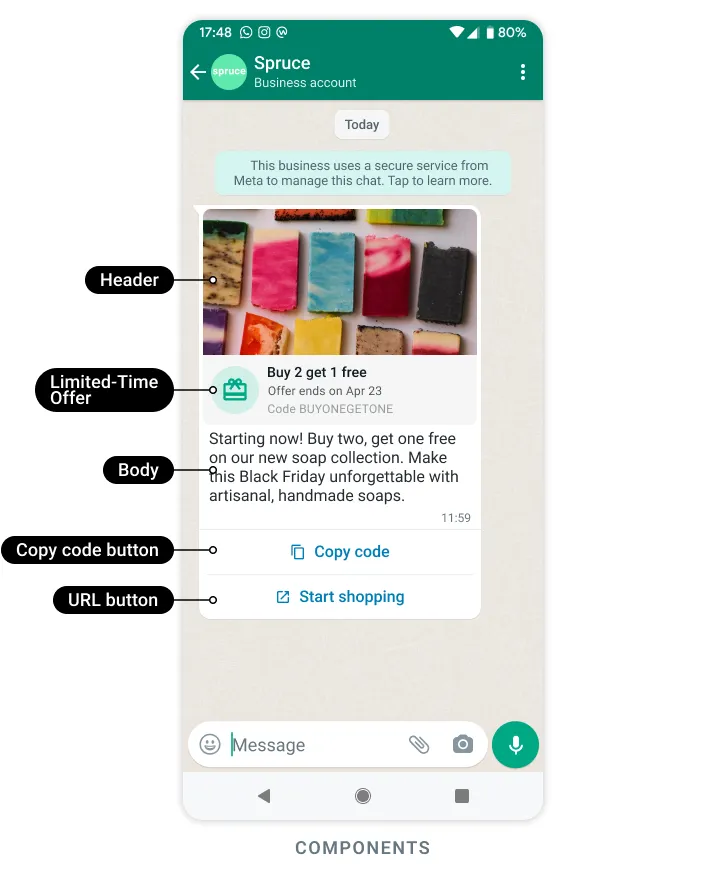
- class pywa.types.templates.LimitedTimeOffer#
Limited-time offer templates allow you to display expiration dates and running countdown timers for offer codes in template messages, making it easy for you to communicate time-bound offers and drive customer engagement.
Only templates categorized as
MARKETINGare supported.FooterTextcomponents are not supported.Users who view a limited-time offer template message using that WhatsApp web app or desktop app will not see the offer, but will instead see a message indicating that they have received a message but that it’s not supported in the client they are using.
Read more at developers.facebook.com.
Example
>>> limited_time_offer = LimitedTimeOffer(
...     text="Limited Time Offer!",
...     has_expiration=True
... )
>>> limited_time_offer.params(expiration_time=datetime.datetime.now() + datetime.timedelta(days=7))
- Variables:
text (str) – Offer details text. Maximum 16 characters.
has_expiration (bool | None) – Set to
Trueto have the offer expiration details appear in the delivered message.
- static params(*, expiration_time)#
Fill the parameters for the limited-time offer component.
- Parameters:
expiration_time (datetime) – The time when the offer expires. This is used to calculate the countdown timer.
- Returns:
An instance of BaseParams containing the expiration time.
- Return type:
_Params
- class pywa.types.templates.Carousel#
Media card carousel templates allow you to send a single text message accompanied by a set of up to 10 media cards in a horizontally scrollable view. Read more about Media Card Carousel Templates.
Product card carousel templates allow you to send a single text message accompanied by a set of up to 10 product cards in a horizontally scrollable view. Read more about Product Card Carousel Templates.
All cards defined on a template must have the same components.
Example
>>> carousel = Carousel(cards=[
...     card1 := CarouselCard(
...         components=[
...             hi1 := HeaderImage(example="https://example.com/card1.jpg"),
...             qr1 := QuickReplyButton(text="Unsubscribe"),
...             u1 := URLButton(text="Website", url="https://website.com?ref={{1}}", example="https://website.com?ref=card1"),
...         ]
...     ),
...     card2 := CarouselCard(
...         components=[
...             hi2 := HeaderImage(example="https://example.com/card2.jpg"),
...             qr2 := QuickReplyButton(text="Unsubscribe"),
...             u2 := URLButton(text="Website", url="https://website.com?ref={{1}}", example="https://website.com?ref=card2"),
...         ]
...     ),
... ])
>>> carousel.params(cards=[
...     card1.params(
...         index=0,
...         params=[
...             hi1.params(image="https://cdn.com/card1.jpg"),
...             qr1.params(callback_data="unsubscribe_card1", index=0),
...             u1.params(url_variable="card1", index=1),
...         ],
...     ),
...     card2.params(
...         index=1,
...         params=[
...             hi2.params(image="https://cdn.com/card2.jpg"),
...             qr2.params(callback_data="unsubscribe_card2", index=0),
...             u2.params(url_variable="card2", index=1),
...         ],
...     ),
... ])
- Variables:
cards (list[pywa.types.templates.CarouselCard]) – A list of
CarouselMediaCardobjects, each representing a media card in the carousel.
- class pywa.types.templates.CarouselCard#
Represents a card in a carousel template.
Example
>>> carousel_media_card = CarouselCard(
...     components=[
...         hi := HeaderImage(example="https://example.com/image.jpg"),
...         qrb := QuickReplyButton(text="Unsubscribe"),
...     ]
... )
>>> carousel_media_card.params(
...     index=0,
...     params=[
...         hi.params(image="https://cdn.com/image.jpg"),
...         qrb.params(callback_data="unsubscribe", index=0),
...     ],
... )
- Variables:
components (list[pywa.types.templates.TemplateBaseComponent | dict]) – A list of components that make up the card, such as header, body, footer, and buttons.
- static params(*, params, index)#
Fill the parameters for the carousel card.
- class pywa.types.templates.TapTargetConfiguration#
Tap target title URL override
Tap target override enables image-based, text-based, and header-less message templates to function as interactive Call-to-Action URL buttons. These buttons display a custom title and open the destination linked to the first URL button.
Read more at developers.facebook.com.
- class pywa.types.templates.AuthenticationBody#
Authentication body component for Authentication templates.
Example
>>> authentication_body = AuthenticationBody(add_security_recommendation=True)
>>> authentication_body.params(otp="123456")
- Variables:
add_security_recommendation (bool | None) – Set to
Trueif you want the template to include the string For your security, do not share this code. Set toFalseto exclude the string.
- static params(*, otp)#
Fill the parameters for the authentication body component.
- Parameters:
otp (str) – The one-time password or code to be used in the body text. Maximum 15 characters.
- Returns:
An instance of BaseParams containing the OTP.
- Return type:
_Params
- static library_input(*, add_contact_number=None, add_security_recommendation=None, code_expiration_minutes=None)#
Fill the library body input for the authentication body component.
- Parameters:
add_contact_number (bool | None) – Set to
Trueto include the user’s contact number in the body text.add_security_recommendation (bool | None) – Set to
Trueto include the security recommendation in the body text.code_expiration_minutes (bool | None) – Set to
Trueto include the code expiration minutes in the body text.
- Returns:
An instance of BaseLibraryBodyInput containing the parameters for the authentication body.
- Return type:
_LibraryInput
Authentication footer component for Authentication templates.
Example
>>> authentication_footer = AuthenticationFooter(code_expiration_minutes=5)
- Variables:
code_expiration_minutes (int) – Indicates the number of minutes the password or code is valid. If included, the code expiration warning and this value will be displayed in the delivered message. The button will be disabled in the delivered message the indicated number of minutes from when the message was sent. If omitted, the code expiration warning will not be displayed in the delivered message. In addition, the button will be disabled 10 minutes from when the message was sent. Minimum 1, maximum 90.
- class pywa.types.templates.TemplatesResult#
Bases:
Result[TemplateDetails]Represents the result of a templates query.
- Variables:
total_count (int) – The total number of message templates that belong to a WhatsApp Business Account.
message_template_count (int) – The current number of message templates that belong to the WhatsApp Business Account.
message_template_limit (int) – The maximum number of message templates that can belong to a WhatsApp Business Account.
are_translations_complete (bool) – The status for template translations.
- class pywa.types.templates.CreatedTemplate#
Represents a created WhatsApp Template.
- Variables:
id – the template ID.
status (TemplateStatus) – the template status.
category – the template category.
- class pywa.types.templates.CreatedTemplates#
Represents a collection of created WhatsApp Templates.
- Variables:
templates (tuple[pywa.types.templates.CreatedTemplate, ...]) – A list of CreatedTemplate instances.
- class pywa.types.templates.UpdatedTemplate#
Represents the result of a template update operation.
- class pywa.types.templates.TemplateUnpauseResult#
Represents the result of a template unpause operation.
>>> wa = WhatsApp(...)
>>> template = wa.get_template(template_id=123456)
>>> if template.status == TemplateStatus.PAUSED:
...     result = template.unpause()
- class pywa.types.templates.TemplatesCompareResult#
Represents the result of a template comparison query.
- Variables:
block_rate (list[str] | None) – Array of template ID strings, in increasing order of block rate (ratio of blocks to sends).
times_sent (dict[str, int] | None) – A dictionary mapping template IDs to the number of times each template has been sent.
top_block_reason (dict[str, pywa.types.templates.TopBlockReasonType] | None) – A dictionary mapping template IDs to the top reason for blocking each template.
- class pywa.types.templates.TopBlockReasonType#
The top reason that customers reported when they blocked your WhatsApp phone number after receiving one of your message templates. The reasons include: Spam, Didn’t sign up, No longer needed, Offensive messages. Note that Top block reason is only visible when a significant number of customers block your number.
Read more at facebook.com.
- Variables:
NO_LONGER_NEEDED – If a customer indicated they no longer needed the message, they may not need that service or product anymore. Make sure your audience is still in need of your service or product by regularly reviewing your audience lists.
NO_REASON – A customer blocked your number but did not indicate why. Selecting a reason for blocking a message is not required.
NO_REASON_GIVEN – A customer blocked your number but did not indicate why. Selecting a reason for blocking a message is not required.
NO_SIGN_UP – If a customer indicated that they didn’t sign up, they may not have opted in to receiving messages. Make sure you have obtained permission from users to receive messages on WhatsApp.
OFFENSIVE_MESSAGES – If a customer indicated the message was offensive, they may have found it inappropriate. Check your messages to ensure that they don’t contain rude, foul or harassing language, adult content, or prohibited or illegal activity.
OTHER – A customer may choose Other as a reason for blocking your number. When the top reason for blocking has been determined to be Other, then Unknown block reason will be shown. It may also be the top block reason in cases where there is an insufficient amount of data.
OTP_DID_NOT_REQUEST – If a customer indicated that they did not request an OTP, they may have received an OTP without requesting it. Make sure you are only sending OTPs to users who have requested them.
SPAM – If a customer indicated that spam is the reason for blocking, they may have received too many messages in a short period of time. Try being more selective about the frequency of messages.
UNKNOWN_BLOCK_REASON – A customer may choose Other as a reason for blocking your number. When the top reason for blocking has been determined to be Other, then Unknown block reason will be shown. It may also be the top block reason in cases where there is an insufficient amount of data.
- class pywa.types.templates.MigrateTemplatesResult#
Represents the response from migrating templates from one WhatsApp Business Account to another.
- Variables:
migrated (tuple[pywa.types.templates.MigratedTemplate, ...]) – templates that were successfully duplicated in the destination WhatsApp Business Account.
failed (tuple[pywa.types.templates.MigratedTemplateError, ...]) – templates that failed to be duplicated in the destination WhatsApp Business Account, along with the reason for failure.
- class pywa.types.templates.MigratedTemplate#
Represents a successfully migrated template.
- Variables:
id (str) – The unique identifier of the migrated template.
- class pywa.types.templates.MigratedTemplateError#
Represents an error that occurred while migrating a template.
- class pywa.types.templates.DegreesOfFreedomSpec#
Represents the degrees of freedom specification for a template.
- Variables:
creative_features_spec (pywa.types.templates.CreativeFeaturesSpec) – The creative features specification for the template.
- class pywa.types.templates.CreativeFeaturesSpec#
Automatic Creative Optimizations enhance the visual appeal and engagement of Marketing template messages.
This capability tests minor variations of your existing image header with different crop orientations or color filters, and automatically selects the variant which is getting the highest click-through rate over time with no input needed from you. These creative enhancements are designed to help improve performance and visual appeal of marketing messages, while maintaining the fidelity of the message. These optimizations are similar to Advantage+ creative.
Read more at developers.facebook.com.
Note
Automatic Creative Optimizations are currently only available to businesses participating in early access. It will be made available to all businesses on a future date.
- Variables:
image_brightness_and_contrast –
Whether to apply brightness and contrast adjustments to images. Read more at developers.facebook.com.
image_touchups –
Whether to apply touch-ups to images. Read more at developers.facebook.com.
add_text_overlay –
Whether to automatically add a text overlay onto your image using your message content. Read more at developers.facebook.com.
image_animation –
Whether to automatically transform your header image into an animated GIF. Read more at developers.facebook.com.
image_background_gen –
Whether to generate backgrounds for images. Read more at developers.facebook.com.
text_extraction_for_headline –
Whether to extract keywords or phrases from your message to create a headline for your body text to highlight key information. Read more at developers.facebook.com.
text_extraction_for_tap_target –
Whether to extract keywords or phrases from your message to create a title for the tap-target area to highlight key information. Read more at developers.facebook.com.
product_extensions –
Whether to enhances single-image creatives by appending a set of additional catalog products users are likely to engage or convert with, creating more personalized and relevant experiences. Read more at developers.facebook.com.
text_formatting_optimization –
Whether to update the formatting of text (e.g. remove unnecessary spaces, bold phrases) to increase performance. No text content is changed - format only. Read more at developers.facebook.com.
auto_promotion_tag –
Whether to automatically extract the promotion tag, like “30% off”, “50% discount”, “Free shipping” from messages to create a promotion tag and put it into the image to highlight promotion information. Read more at developers.facebook.com.
hyperlink_formatting –
Whether to automatically transform any URL links in the message body by either shortening the link or applying markdown formatting (hyperlinks) to adjacent key phrases to improve message digestibility. Read more at developers.facebook.com.
image_banner –
Whether to automatically apply colorful paddings to transform the image creative to the optimal aspect ratio to enhance visual appeal and improve media digestibility. Read more at developers.facebook.com.