🎛️ Handlers#
To process updates from WhatsApp, your application needs to receive incoming webhooks. This is done by running a web server that listens for requests from WhatsApp and passes them to your handlers.
Why pywa Doesn’t Start the Server?
pywa is designed for maximum flexibility — it does not run the server for you.
Instead, it only registers the route that will handle incoming updates.
This means you can:
Use any web framework you like.
Configure your server however you want.
Serve other parts of your app alongside
pywawithout restrictions.
Note
Pywa has built-in support for FastAPI and Flask, but you can use any framework that supports handling HTTP requests.
Setting Up a Callback URL#
For WhatsApp to send updates to your server, you must provide a callback URL — a public, secure (HTTPS) endpoint that points to your running server.
If you’re developing locally, you can use tunneling services like:
These create a secure, public URL that forwards traffic to your local machine.
Example using ngrok:
ngrok http 8080
Once you have a public URL, you must register it with WhatsApp — either automatically (via pywa) or manually (via the WhatsApp App Dashboard).
Option 1: Automatic Callback URL Registration#
This is the simplest method — pywa will:
Register your callback URL with WhatsApp.
Handle the verification request for you.
Requirements:
Your WhatsApp App ID and Secret (unless you’re setting callback_url_scope to
PHONEorWABA). See Facebook docs for how to get them.
Example using FastAPI:
 1import fastapi
 2from pywa import WhatsApp
 3
 4fastapi_app = fastapi.FastAPI()
 5
 6wa = WhatsApp(
 7    phone_id='1234567890',
 8    token='xxxxxx',
 9    server=fastapi_app,
10    callback_url='https://subdomain.ngrok.io',  # Your public URL
11    verify_token='XYZ123',
12    app_id=123456,
13    app_secret='xxxxxx'
14)
15
16# Register your handlers here
Run the server:
fastapi dev main.py --port 8080
Note
The port must match the one you expose via your tunnel.
Example: ngrok http 8080 means your server should run on port 8080.
Option 2: Manual Callback URL Registration#
If you prefer to register the callback URL yourself:
Start your server so
pywacan handle WhatsApp’s verification request.Go to App Dashboard > WhatsApp > Configuration.
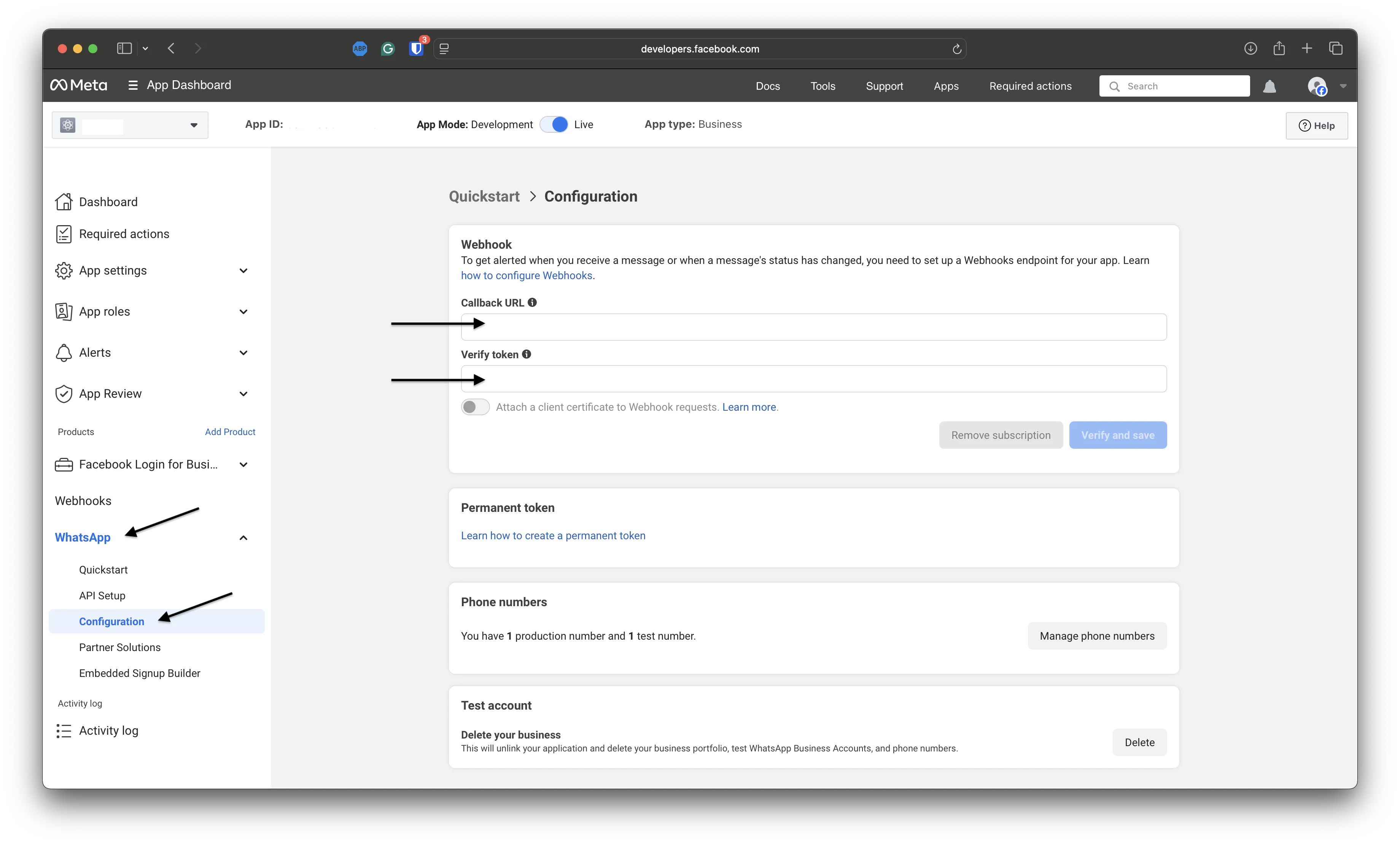
Enter:
Your server’s public URL (e.g.,
https://subdomain.ngrok.io).The
verify_tokenyou used in yourWhatsAppclient initialization.
Example using FastAPI:
 1import fastapi
 2from pywa import WhatsApp
 3
 4fastapi_app = fastapi.FastAPI()
 5
 6wa = WhatsApp(
 7    phone_id='1234567890',
 8    token='xxxxxx',
 9    server=fastapi_app,
10    verify_token='XYZ123',
11)
12
13# Register your handlers here
Run the server:
fastapi dev main.py --port 8080
Subscribing to Webhook Fields#
When registering manually, you must also subscribe to webhook fields in your app settings.
Go to App Dashboard > WhatsApp > Configuration and scroll down to the Webhook Fields section.
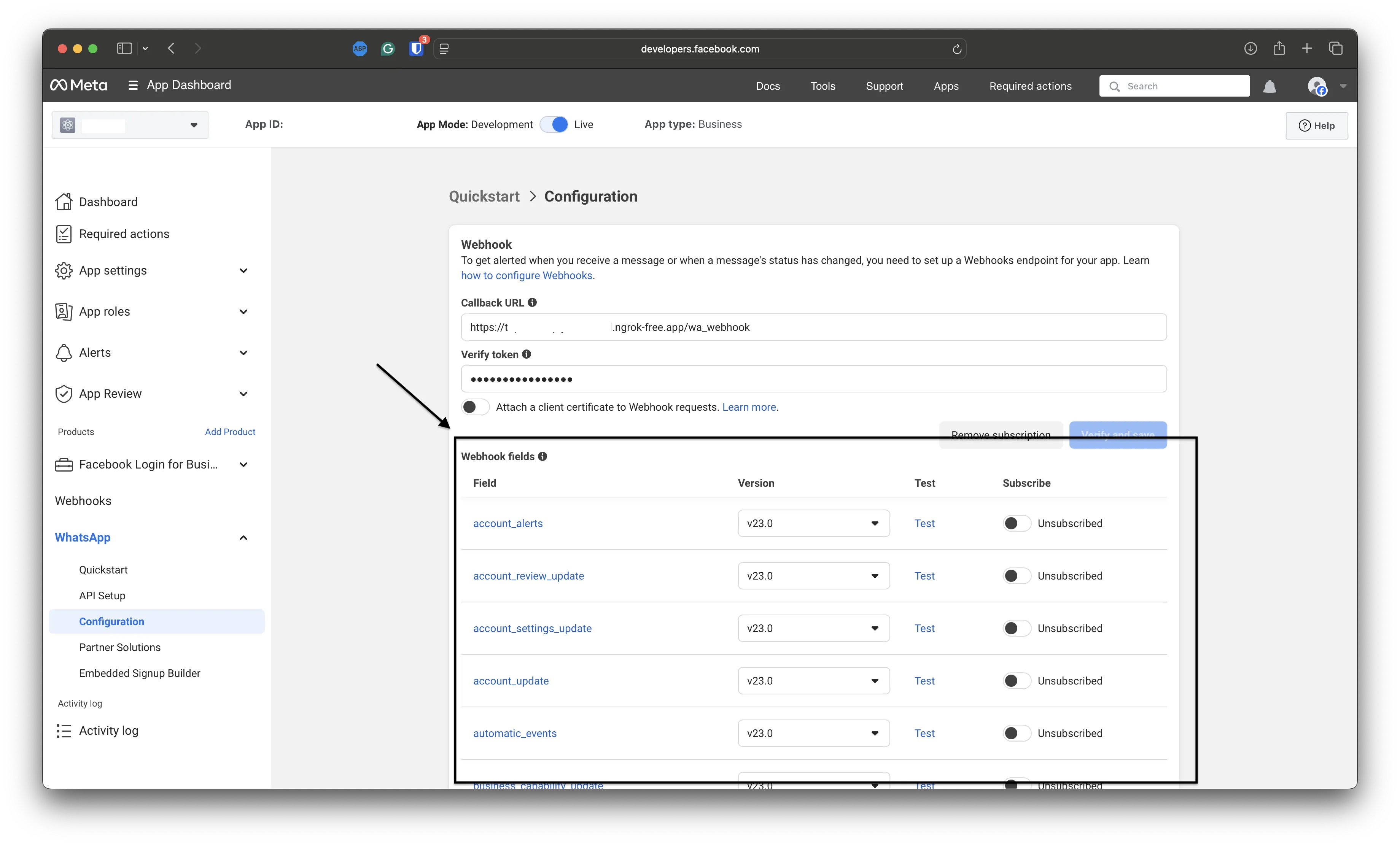
Supported by pywa:
messages– all user-related updates (messages, callbacks, message statuses)calls– call connect, terminate, and status updatesmessage_template_status_update– template approval/rejection changesmessage_template_quality_update– template quality score changesmessage_template_components_update– template component changes (header, body, footer, buttons)template_category_update– template category changesuser_preferences– user marketing preferences
You can also subscribe to other fields, but they won’t be processed automatically — use on_raw_update() to handle them.
Once everything is set up correctly, WhatsApp will start sending updates to your webhook URL.
Registering Callback Functions#
To handle incoming updates, you must register callback functions. These functions are called whenever WhatsApp sends an update.
A callback function must accept two arguments:
The WhatsApp client object (
WhatsApp)The update object (
Message,CallbackButton, etc.)
Example:
from pywa import WhatsApp, types

def echo_ok(client: WhatsApp, msg: types.Message):
    msg.reply("Ok")

def react_to_button(client: WhatsApp, clb: types.CallbackButton):
    clb.react("❤️")
Once defined, you can register callbacks in two main ways:
Using decorators#
The simplest approach is with the on_... decorators such as on_message(), on_callback_button() etc.
 1from pywa import WhatsApp, types
 2from fastapi import FastAPI
 3
 4fastapi_app = FastAPI()
 5wa = WhatsApp(..., server=fastapi_app)
 6
 7@wa.on_message
 8def handle_message(client: WhatsApp, msg: types.Message):
 9    print(msg)
10
11@wa.on_callback_button
12def handle_callback_button(client: WhatsApp, clb: types.CallbackButton):
13    print(clb.data)
fastapi dev main.py
Tip
If you don’t have access to the client instance (e.g., in a module where you define handlers), you can register handlers directly on the WhatsApp class.
Example:
1from pywa import WhatsApp, types
2from fastapi import FastAPI
3
4@WhatsApp.on_message  # Register with the class itself
5def handle_message(client: WhatsApp, msg: types.Message):
6    print(msg)
Then load the handlers in your main file:
1from pywa import WhatsApp
2import my_handlers  # Import the module with your handlers
3
4wa = WhatsApp(..., handlers_modules=[my_handlers])
5
6# Or dynamically:
7wa = WhatsApp(...)
8wa.load_handlers_modules(my_handlers)
Using Handler objects#
For larger projects, or when you need to register handlers dynamically, you can wrap callback functions in Handler objects and add them via add_handlers().
Example:
1from pywa import WhatsApp, types
2
3def handle_message(client: WhatsApp, msg: types.Message):
4    print(msg.text)
5
6def handle_callback_button(client: WhatsApp, clb: types.CallbackButton):
7    print(clb.data)
 1from pywa import WhatsApp, handlers
 2from fastapi import FastAPI
 3import my_handlers  # Import the module with your handlers
 4
 5fastapi_app = FastAPI()
 6wa = WhatsApp(..., server=fastapi_app)
 7
 8wa.add_handlers(
 9    handlers.MessageHandler(callback=my_handlers.handle_message),
10    handlers.CallbackButtonHandler(callback=my_handlers.handle_callback_button),
11)
fastapi dev main.py
Available Handlers#
Decorator |
Handler |
Update type |
|---|---|---|
|
||
|
||
Filtering updates#
You can filter incoming updates by passing filters to your handlers. This is useful when you only want to react to specific types of messages.
1from pywa import WhatsApp, types, filters
2
3wa = WhatsApp(...)
4
5@wa.on_message(filters.text)  # Only handle text messages
6def echo(client: WhatsApp, msg: types.Message):
7    msg.reply(text=msg.text)  # msg.text is guaranteed to exist here
Tip
Explore the filters module for built-in filters,
or create your own. See more in the filters guide.
Using listeners instead of handlers#
Handlers are best for entry points in your app (e.g., commands or button clicks). When you need to collect additional input from the user (like their age or address), you can use listeners instead of registering a new handler at runtime.
1from pywa import WhatsApp, types, filters
2
3wa = WhatsApp(...)
4
5@wa.on_message(filters.command("start"))
6def start(_: WhatsApp, msg: types.Message):
7    age = msg.reply("Hello! What's your age?").wait_for_reply(filters.text).text
8    ...
Note
Read more about listeners in the listeners guide.
Controlling handler flow#
By default, once a handler processes an update, no other handlers are called.
 1from pywa import WhatsApp, types
 2
 3wa = WhatsApp(...)
 4
 5@wa.on_message
 6def handle_message(client: WhatsApp, msg: types.Message):
 7    print(msg)
 8    # No further handlers will run
 9
10@wa.on_message
11def handle_message2(client: WhatsApp, msg: types.Message):
12    print(msg)
Tip
Handlers run in the order they’re registered, unless you set a priority.
A higher priority value means the handler runs earlier.
 1from pywa import WhatsApp, types
 2
 3wa = WhatsApp(...)
 4
 5@wa.on_message(priority=1)
 6def first(client: WhatsApp, msg: types.Message):
 7    print("First:", msg)
 8
 9@wa.on_message(priority=2)  # Will run before the previous handler
10def second(client: WhatsApp, msg: types.Message):
11    print("Second:", msg)
You can change the default behavior by enabling continue_handling when creating the client:
1wa = WhatsApp(..., continue_handling=True)
2
3@wa.on_message
4def handler(client: WhatsApp, msg: types.Message):
5    print(msg)
6    # The next handler WILL also run
You can also decide per-message inside a handler by using
stop_handling() or
continue_handling():
 1from pywa import WhatsApp, types, filters
 2
 3wa = WhatsApp(...)
 4
 5@wa.on_message(filters.text)
 6def handle_message(client: WhatsApp, msg: types.Message):
 7    print(msg)
 8    if msg.text == "stop":
 9        msg.stop_handling()       # Stop further handlers
10    else:
11        msg.continue_handling()   # Allow further handlers
Validating updates#
WhatsApp recommends
validating updates using the X-Hub-Signature-256 header.
This ensures the update was really sent by WhatsApp.
To enable validation, pass your app_secret when creating the client:
1from pywa import WhatsApp
2
3wa = WhatsApp(
4    validate_updates=True,  # Enabled by default
5    app_secret="xxxx",
6    ...
7)
If the signature is invalid, pywa automatically responds with
HTTP 401 Unauthorized.
You can disable validation by setting validate_updates=False.
- Handler Decorators
WhatsApp.on_message()WhatsApp.on_callback_button()WhatsApp.on_callback_selection()WhatsApp.on_flow_completion()WhatsApp.on_flow_request()WhatsApp.on_message_status()WhatsApp.on_phone_number_change()WhatsApp.on_identity_change()WhatsApp.on_call_connect()WhatsApp.on_call_terminate()WhatsApp.on_call_status()WhatsApp.on_call_permission_update()WhatsApp.on_user_marketing_preferences()WhatsApp.on_template_status_update()WhatsApp.on_template_category_update()WhatsApp.on_template_quality_update()WhatsApp.on_template_components_update()WhatsApp.on_edited_message()WhatsApp.on_deleted_message()WhatsApp.on_outgoing_message()WhatsApp.on_outgoing_edited_message()WhatsApp.on_outgoing_deleted_message()WhatsApp.on_raw_update()WhatsApp.remove_callbacks()WhatsApp.load_handlers_modules()
- Handler Objects
WhatsApp.add_handlers()WhatsApp.add_flow_request_handler()WhatsApp.remove_handlers()MessageHandlerCallbackButtonHandlerCallbackSelectionHandlerFlowCompletionHandlerFlowRequestHandlerMessageStatusHandlerPhoneNumberChangeHandlerIdentityChangeHandlerCallConnectHandlerCallTerminateHandlerCallStatusHandlerCallPermissionUpdateHandlerUserMarketingPreferencesHandlerTemplateStatusUpdateHandlerTemplateCategoryUpdateHandlerTemplateQualityUpdateHandlerTemplateComponentsUpdateHandlerEditedMessageHandlerDeletedMessageHandlerOutgoingMessageHandlerOutgoingEditedMessageHandlerOutgoingDeletedMessageHandlerRawUpdateHandler