
♻️ Flows#
PyWa has a built-in support for WhatsApp Flows, which allows you to create structured interactions with your users.
From developers.facebook.com:
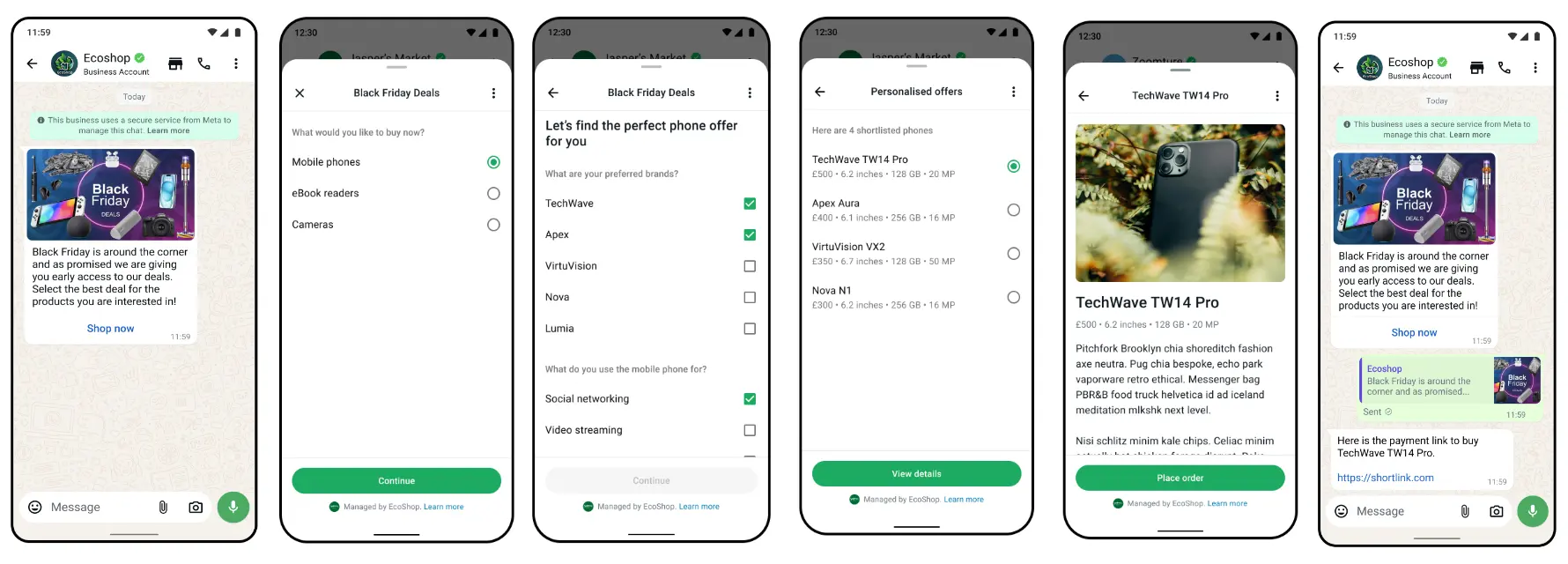
WhatsApp Flows is a way to build structured interactions for business messaging. With Flows, businesses can define, configure, and customize messages with rich interactions that give customers more structure in the way they communicate.
You can use Flows to book appointments, browse products, collect customer feedback, get new sales leads, or anything else where structured communication is more natural or comfortable for your customers.
The Flows are separated into 4 parts:
Creating Flow
Sending Flow
Handling Flow requests and responding to them (Only for dynamic flows)
Getting Flow Completion
Creating Flow#
- First you need to create the flow, give it a name and set the categories by calling
create_flow(): You can also create the flows using the WhatsApp Flow Builder.
 1from pywa import WhatsApp
 2from pywa.types import FlowCategory
 3
 4# WhatsApp Business Account ID (WABA) is required
 5wa = WhatsApp(..., waba_id="1234567890123456")
 6
 7created = wa.create_flow(
 8    name="My New Flow",
 9    categories=[FlowCategory.CUSTOMER_SUPPORT, FlowCategory.SURVEY]
10)
11print(wa.get_flow(created.id))
12
13# FlowDetails(id='1234567890123456', name='My New Flow', status=FlowStatus.DRAFT, ...)
Now you can start building the flow structure.
Tip
You can also provide the flow json when creating the flow by passing the flow_json argument to create_flow(), but here we treat it separately.
1created = wa.create_flow(
2    name="My New Flow",
3    categories=[FlowCategory.CUSTOMER_SUPPORT, FlowCategory.SURVEY],
4    flow_json=FlowJSON(...)  # The flow json to create,
5    publish=True,  # If you want to publish the flow immediately
6)
A flow is collection of screens containing components. screens can exchange data with each other and with your server.
Flow can be static: all the components settings are predefined and no interaction is required from your server. Or it can be dynamic: your server can respond to screen actions and determine the next screen to display (or close the flow) and the data to provide to it.
Available components#
Every component on the FlowJSON has a corresponding class in pywa.types.flows:
Category |
Types |
|---|---|
Static elements |
|
Collect data |
|
Navigation |
|
Conditional Component Rendering |
|
Actions |
|
Helpers |
|
Here is an example of static flow:
 1from pywa.types.flows import *
 2
 3flow = FlowJSON(
 4    version=7.0,
 5    screens=[
 6        Screen(
 7            id="NEWSLETTER_SUBSCRIPTION",
 8            title="Subscribe to our Newsletter",
 9            terminal=True,
10            layout=Layout(
11                children=[
12                    full_name := TextInput(
13                        name="full_name",
14                        label="Full Name",
15                        input_type=InputType.TEXT,
16                        required=True,
17                    ),
18                    email := TextInput(
19                        name="email",
20                        label="Email Address",
21                        input_type=InputType.EMAIL,
22                        required=True,
23                    ),
24                    is_subscribed := OptIn(
25                        name="is_subscribed",
26                        label="Subscribe to our newsletter",
27                        required=True,
28                        on_click_action=OpenURLAction(
29                            url="https://pywa.readthedocs.io/",
30                        ),
31                    ),
32                    Footer(
33                        label="Subscribe",
34                        on_click_action=CompleteAction(
35                            payload={
36                                "full_name": full_name.ref,
37                                "email": email.ref,
38                                "is_subscribed": is_subscribed.ref,
39                            },
40                        ),
41                    ),
42                ],
43            ),
44        )
45    ],
46)
Which is the equivalent of the following flow json:
 1{
 2    "version": "7.0",
 3    "screens": [
 4        {
 5            "id": "NEWSLETTER_SUBSCRIPTION",
 6            "title": "Subscribe to our Newsletter",
 7            "terminal": true,
 8            "layout": {
 9                "type": "SingleColumnLayout",
10                "children": [
11                    {
12                        "type": "TextInput",
13                        "name": "full_name",
14                        "label": "Full Name",
15                        "input-type": "text",
16                        "required": true
17                    },
18                    {
19                        "type": "TextInput",
20                        "name": "email",
21                        "label": "Email Address",
22                        "input-type": "email",
23                        "required": true
24                    },
25                    {
26                        "type": "OptIn",
27                        "name": "is_subscribed",
28                        "label": "Subscribe to our newsletter",
29                        "required": true,
30                        "on-click-action": {
31                            "name": "open_url",
32                            "url": "https://pywa.readthedocs.io/"
33                        }
34                    },
35                    {
36                        "type": "Footer",
37                        "label": "Subscribe",
38                        "on-click-action": {
39                            "name": "complete",
40                            "payload": {
41                                "full_name": "${form.full_name}",
42                                "email": "${form.email}",
43                                "is_subscribed": "${form.is_subscribed}"
44                            }
45                        }
46                    }
47                ]
48            }
49        }
50    ]
51}
And this is how it looks like on WhatsApp (iOS/Android):
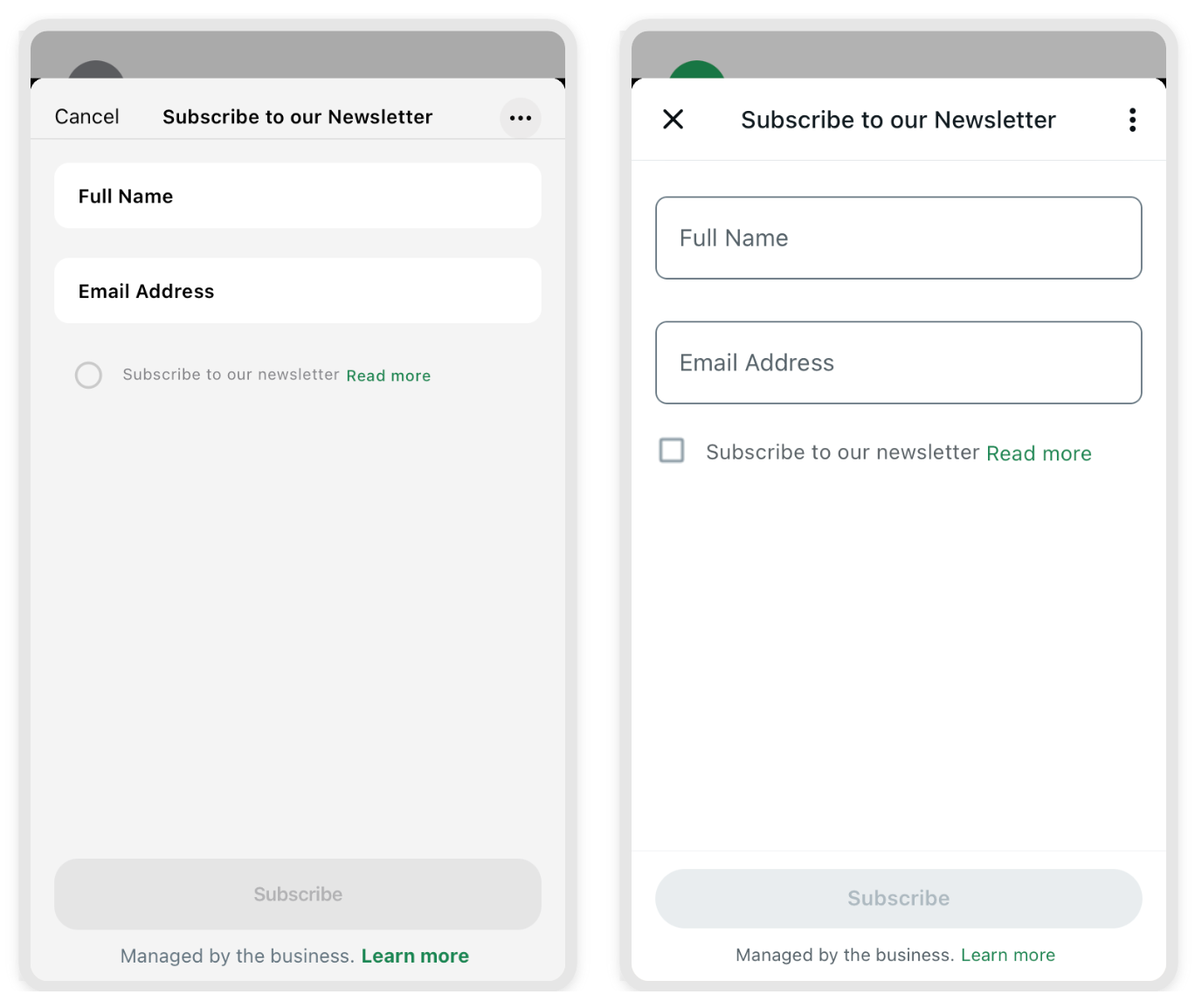
After you have the flow json, you can update the flow with update_flow_json():
 1from pywa import WhatsApp
 2from pywa.types.flows import *
 3
 4your_flow_json = FlowJSON(...)  # keep edit your flow
 5
 6if __name__ == "__main__":
 7    wa = WhatsApp(..., waba_id="1234567890123456") # waba id is required for creating flows
 8    # created = wa.create_flow(name="Newsletter Flow", categories=[FlowCategory.CONTACT_US])
 9
10    res = wa.update_flow_json(flow_id=created.id, flow_json=newsletter_flow)
11    if not res: # If the flow was not updated successfully
12        print("Validation errors:")
13        for error in res.validation_errors:
14            print(error)
The flow_json argument can be FlowJSON, a dict, json str, json file pathlib.Path or a file-like object.
You can get the FlowDetails of the flow with get_flow():
1flow = wa.get_flow(created.id)
2print(flow)
Or getting all the flows with get_flows():
1flows = wa.get_flows()
2for flow in flows:
3    print(flow)
To test your flow you need to sent it:
Sending Flow#
Flow is just a FlowButton attached to a message.
Let’s see how to send text message with flow:
 1from pywa import WhatsApp
 2from pywa.types import FlowButton
 3
 4wa = WhatsApp(...)
 5
 6wa.send_message(
 7    to="1234567890",
 8    text="Hi, You need to finish your sign up!",
 9    buttons=FlowButton(
10        title="Finish Sign Up", # The button title that will appear on the bottom of the message
11        flow_id="1234567890123456",  # The `ewsletter_flow` flow id from above
12        mode=FlowStatus.DRAFT, # If the flow is in draft mode, you must specify the mode as `FlowStatus.DRAFT`.
13        flow_action_type=FlowActionType.NAVIGATE, # You tell WhatsApp what to do when the user clicks the button.
14        flow_action_screen="SIGN_UP", # The screen id to navigate to when the user clicks the button.
15    )
16)
Getting Flow Completion message#
When the user completes the flow, you will receive a request to your webhook with the payload you sent when you completed the flow.
Here is how to listen to flow completion update:
1from pywa import WhatsApp
2from pywa.types import FlowCompletion
3
4wa = WhatsApp(...)
5
6@wa.on_flow_completion
7def on_flow_completion(_: WhatsApp, flow: FlowCompletion):
8    print(f"The user {flow.from_user.name} just completed the flow!")
9    print(flow.response)
The .response attribute is the payload you sent when you completed the flow.
Note
if you using PhotoPicker or DocumentPicker components, you will receive the files inside the flow completion .response.
You can constract them into pywa media objects by using get_media():
1from pywa import WhatsApp, types
2
3wa = WhatsApp(...)
4
5@wa.on_flow_completion
6def on_flow_completion(_: WhatsApp, flow: FlowCompletion):
7    img = flow.get_media(types.Image, key="profile_pic")
8    img.download()
Handling Flow requests#
This is when things get interesting. WhatsApp Flows can be dynamic, which means that you can handle user actions and respond to them in real-time from your server.
Note
Since the requests and responses can contain sensitive data, such as passwords and other personal information, all the requests and responses are encrypted using the WhatsApp Business Encryption.
Before you continue, you need to sign and upload the business public key. First you need to generate a private key and a public key:
Generate a public and private RSA key pair by typing in the following command:
>>> openssl genrsa -des3 -out private.pem 2048
This generates 2048-bit RSA key pair encrypted with a password you provided and is written to a file.
Next, you need to export the RSA Public Key to a file.
>>> openssl rsa -in private.pem -outform PEM -pubout -out public.pem
This exports the RSA Public Key to a file.
Once you have the public key, you can upload it using the set_business_public_key() method.
1from pywa import WhatsApp
2
3wa = WhatsApp(...)
4
5wa.set_business_public_key(open("public.pem").read())
Every request need to be decrypted using the private key. so you need to provide it when you create the WhatsApp object:
1from pywa import WhatsApp
2
3wa = WhatsApp(..., business_private_key=open("private.pem").read())
Now you are ready to handle the requests.
Just one more thing, the default decryption & encryption implementation is using the cryptography library, So you need to install it:
>>> pip3 install cryptography
Or when installing PyWa:
>>> pip3 install "pywa[cryptography]"
Let’s see an example of a dynamic flow:
  1from pywa.types.flows import *
  2
  3flow = FlowJSON(
  4    version="7.2",
  5    data_api_version="3.0",
  6    routing_model={
  7        "SIGN_IN": ["SIGN_UP", "FORGOT_PASSWORD"],
  8        "SIGN_UP": ["TERMS_AND_CONDITIONS"],
  9        "FORGOT_PASSWORD": [],
 10        "TERMS_AND_CONDITIONS": [],
 11    },
 12    screens=[
 13        signin_screen := Screen(
 14            id="SIGN_IN",
 15            title="Sign in",
 16            terminal=True,
 17            success=True,
 18            data=[
 19                welcome := ScreenData(
 20                    key="welcome",
 21                    example="Welcome back! Please sign in to continue.",
 22                ),
 23                default_email := ScreenData(
 24                    key="default_email",
 25                    example="johndoe@gmail.com",
 26                ),
 27            ],
 28            layout=Layout(
 29                children=[
 30                    TextSubheading(text=welcome.ref),
 31                    signin_email := TextInput(
 32                        name="email",
 33                        label="Email address",
 34                        input_type=InputType.EMAIL,
 35                        required=True,
 36                        init_value=default_email.ref,
 37                    ),
 38                    signin_password := TextInput(
 39                        name="password",
 40                        label="Password",
 41                        input_type=InputType.PASSWORD,
 42                        required=True,
 43                    ),
 44                    EmbeddedLink(
 45                        text="Don't have an account? Sign up",
 46                        on_click_action=NavigateAction(next=Next(name="SIGN_UP")),
 47                    ),
 48                    EmbeddedLink(
 49                        text="Forgot password",
 50                        on_click_action=NavigateAction(
 51                            next=Next(name="FORGOT_PASSWORD"),
 52                        )
 53                    ),
 54                    Footer(
 55                        label="Sign in",
 56                        on_click_action=DataExchangeAction(
 57                            payload={
 58                                "email": signin_email.ref,
 59                                "password": signin_password.ref,
 60                            }
 61                        ),
 62                    ),
 63                ]
 64            ),
 65        ),
 66        signup_screen := Screen(
 67            id="SIGN_UP",
 68            title="Sign up",
 69            layout=Layout(
 70                children=[
 71                    first_name := TextInput(
 72                        name="first_name",
 73                        label="First Name",
 74                        input_type=InputType.TEXT,
 75                        required=True,
 76                    ),
 77                    last_name := TextInput(
 78                        name="last_name",
 79                        label="Last Name",
 80                        input_type=InputType.TEXT,
 81                        required=True,
 82                    ),
 83                    signup_email := TextInput(
 84                        name="email",
 85                        label="Email address",
 86                        input_type=InputType.EMAIL,
 87                        init_value=signin_screen / signin_email.ref,
 88                        required=True,
 89                    ),
 90                    signup_password := TextInput(
 91                        name="password",
 92                        label="Set password",
 93                        input_type=InputType.PASSWORD,
 94                        init_value=signin_screen / signin_password.ref,
 95                        required=True,
 96                    ),
 97                    confirm_password := TextInput(
 98                        name="confirm_password",
 99                        label="Confirm password",
100                        helper_text="Min 8 chars, incl. 1 number & 1 special character.",
101                        input_type=InputType.PASSWORD,
102                        init_value=signin_screen / signin_password.ref,
103                        required=True,
104                    ),
105                    terms_agreement := OptIn(
106                        name="terms_agreement",
107                        label="I agree with the terms.",
108                        on_click_action=NavigateAction(
109                            next=Next(type="screen", name="TERMS_AND_CONDITIONS")
110                        ),
111                        required=True,
112                    ),
113                    offers_acceptance := OptIn(
114                        name="offers_acceptance",
115                        label="I would like to receive news and offers.",
116                    ),
117                    Footer(
118                        label="Sign up",
119                        on_click_action=DataExchangeAction(
120                            payload={
121                                "first_name": first_name.ref,
122                                "last_name": last_name.ref,
123                                "email": signup_email.ref,
124                                "password": signup_password.ref,
125                                "confirm_password": confirm_password.ref,
126                                "terms_agreement": terms_agreement.ref,
127                                "offers_acceptance": offers_acceptance.ref,
128                            }
129                        ),
130                    ),
131                ]
132            ),
133        ),
134        forgot_password_screen := Screen(
135            id="FORGOT_PASSWORD",
136            title="Forgot password",
137            terminal=True,
138            success=True,
139            layout=Layout(
140                children=[
141                    TextBody(text="Enter your email address for your account and we'll send a reset link. The single-use link will expire after 24 hours."),
142                    forgot_password_email := TextInput(
143                        name="email",
144                        label="Email address",
145                        input_type=InputType.EMAIL,
146                        init_value=signin_screen / signin_email.ref,
147                        required=True,
148                    ),
149                    Footer(
150                        label="Send reset link",
151                        on_click_action=DataExchangeAction(
152                            payload={"email": forgot_password_email.ref}
153                        ),
154                    ),
155                ]
156            ),
157        ),
158        Screen(
159            id="TERMS_AND_CONDITIONS",
160            title="Terms and conditions",
161            layout=Layout(
162                children=[
163                    TextHeading(text="Our Terms"),
164                    TextSubheading(text="Data usage"),
165                    TextBody(
166                        text="Lorem ipsum dolor sit amet, consectetur adipiscing elit. Sed vitae odio dui. Praesent ut nulla tincidunt, scelerisque augue malesuada, volutpat lorem. Aliquam iaculis ex at diam posuere mollis. Suspendisse eget purus ac tellus interdum pharetra. In quis dolor turpis. Fusce in porttitor enim, vitae efficitur nunc. Fusce dapibus finibus volutpat. Fusce velit mi, ullamcorper ac gravida vitae, blandit quis ex. Fusce ultrices diam et justo blandit, quis consequat nisl euismod. Vestibulum pretium est sem, vitae convallis justo sollicitudin non. Morbi bibendum purus mattis quam condimentum, a scelerisque erat bibendum. Nullam sit amet bibendum lectus."
167                    ),
168                    TextSubheading(text="Privacy policy"),
169                    TextBody(
170                        text="Lorem ipsum dolor sit amet, consectetur adipiscing elit. Sed vitae odio dui. Praesent ut nulla tincidunt, scelerisque augue malesuada, volutpat lorem. Aliquam iaculis ex at diam posuere mollis. Suspendisse eget purus ac tellus interdum pharetra. In quis dolor turpis. Fusce in porttitor enim, vitae efficitur nunc. Fusce dapibus finibus volutpat. Fusce velit mi, ullamcorper ac gravida vitae, blandit quis ex. Fusce ultrices diam et justo blandit, quis consequat nisl euismod. Vestibulum pretium est sem, vitae convallis justo sollicitudin non. Morbi bibendum purus mattis quam condimentum, a scelerisque erat bibendum. Nullam sit amet bibendum lectus."
171                    ),
172                ]
173            ),
174        ),
175    ],
176)
Which is the equivalent of the following flow json:
  1{
  2    "version": "7.2",
  3    "data_api_version": "3.0",
  4    "routing_model": {
  5        "SIGN_IN": [
  6            "SIGN_UP",
  7            "FORGOT_PASSWORD"
  8        ],
  9        "SIGN_UP": [
 10            "TERMS_AND_CONDITIONS"
 11        ],
 12        "FORGOT_PASSWORD": [],
 13        "TERMS_AND_CONDITIONS": []
 14    },
 15    "screens": [
 16        {
 17            "id": "SIGN_IN",
 18            "title": "Sign in",
 19            "data": {
 20                "welcome": {
 21                    "type": "string",
 22                    "__example__": "Welcome back! Please sign in to continue."
 23                },
 24                "default_email": {
 25                    "type": "string",
 26                    "__example__": "johndoe@gmail.com"
 27                }
 28            },
 29            "terminal": true,
 30            "success": true,
 31            "layout": {
 32                "type": "SingleColumnLayout",
 33                "children": [
 34                    {
 35                        "type": "TextSubheading",
 36                        "text": "${data.welcome}"
 37                    },
 38                    {
 39                        "type": "TextInput",
 40                        "name": "email",
 41                        "label": "Email address",
 42                        "input-type": "email",
 43                        "required": true,
 44                        "init-value": "${data.default_email}"
 45                    },
 46                    {
 47                        "type": "TextInput",
 48                        "name": "password",
 49                        "label": "Password",
 50                        "input-type": "password",
 51                        "required": true
 52                    },
 53                    {
 54                        "type": "EmbeddedLink",
 55                        "text": "Don't have an account? Sign up",
 56                        "on-click-action": {
 57                            "name": "navigate",
 58                            "next": {
 59                                "name": "SIGN_UP",
 60                                "type": "screen"
 61                            },
 62                            "payload": {}
 63                        }
 64                    },
 65                    {
 66                        "type": "EmbeddedLink",
 67                        "text": "Forgot password",
 68                        "on-click-action": {
 69                            "name": "navigate",
 70                            "next": {
 71                                "name": "FORGOT_PASSWORD",
 72                                "type": "screen"
 73                            },
 74                            "payload": {}
 75                        }
 76                    },
 77                    {
 78                        "type": "Footer",
 79                        "label": "Sign in",
 80                        "on-click-action": {
 81                            "name": "data_exchange",
 82                            "payload": {
 83                                "email": "${form.email}",
 84                                "password": "${form.password}"
 85                            }
 86                        }
 87                    }
 88                ]
 89            }
 90        },
 91        {
 92            "id": "SIGN_UP",
 93            "title": "Sign up",
 94            "layout": {
 95                "type": "SingleColumnLayout",
 96                "children": [
 97                    {
 98                        "type": "TextInput",
 99                        "name": "first_name",
100                        "label": "First Name",
101                        "input-type": "text",
102                        "required": true
103                    },
104                    {
105                        "type": "TextInput",
106                        "name": "last_name",
107                        "label": "Last Name",
108                        "input-type": "text",
109                        "required": true
110                    },
111                    {
112                        "type": "TextInput",
113                        "name": "email",
114                        "label": "Email address",
115                        "input-type": "email",
116                        "required": true,
117                        "init-value": "${screen.SIGN_IN.form.email}"
118                    },
119                    {
120                        "type": "TextInput",
121                        "name": "password",
122                        "label": "Set password",
123                        "input-type": "password",
124                        "required": true,
125                        "init-value": "${screen.SIGN_IN.form.password}"
126                    },
127                    {
128                        "type": "TextInput",
129                        "name": "confirm_password",
130                        "label": "Confirm password",
131                        "input-type": "password",
132                        "required": true,
133                        "helper-text": "Min 8 chars, incl. 1 number & 1 special character.",
134                        "init-value": "${screen.SIGN_IN.form.password}"
135                    },
136                    {
137                        "type": "OptIn",
138                        "name": "terms_agreement",
139                        "label": "I agree with the terms.",
140                        "required": true,
141                        "on-click-action": {
142                            "name": "navigate",
143                            "next": {
144                                "name": "TERMS_AND_CONDITIONS",
145                                "type": "screen"
146                            },
147                            "payload": {}
148                        }
149                    },
150                    {
151                        "type": "OptIn",
152                        "name": "offers_acceptance",
153                        "label": "I would like to receive news and offers."
154                    },
155                    {
156                        "type": "Footer",
157                        "label": "Sign up",
158                        "on-click-action": {
159                            "name": "data_exchange",
160                            "payload": {
161                                "first_name": "${form.first_name}",
162                                "last_name": "${form.last_name}",
163                                "email": "${form.email}",
164                                "password": "${form.password}",
165                                "confirm_password": "${form.confirm_password}",
166                                "terms_agreement": "${form.terms_agreement}",
167                                "offers_acceptance": "${form.offers_acceptance}"
168                            }
169                        }
170                    }
171                ]
172            }
173        },
174        {
175            "id": "FORGOT_PASSWORD",
176            "title": "Forgot password",
177            "terminal": true,
178            "success": true,
179            "layout": {
180                "type": "SingleColumnLayout",
181                "children": [
182                    {
183                        "type": "TextBody",
184                        "text": "Enter your email address for your account and we'll send a reset link. The single-use link will expire after 24 hours."
185                    },
186                    {
187                        "type": "TextInput",
188                        "name": "email",
189                        "label": "Email address",
190                        "input-type": "email",
191                        "required": true,
192                        "init-value": "${screen.SIGN_IN.form.email}"
193                    },
194                    {
195                        "type": "Footer",
196                        "label": "Send reset link",
197                        "on-click-action": {
198                            "name": "data_exchange",
199                            "payload": {
200                                "email": "${form.email}"
201                            }
202                        }
203                    }
204                ]
205            }
206        },
207        {
208            "id": "TERMS_AND_CONDITIONS",
209            "title": "Terms and conditions",
210            "layout": {
211                "type": "SingleColumnLayout",
212                "children": [
213                    {
214                        "type": "TextHeading",
215                        "text": "Our Terms"
216                    },
217                    {
218                        "type": "TextSubheading",
219                        "text": "Data usage"
220                    },
221                    {
222                        "type": "TextBody",
223                        "text": "Lorem ipsum dolor sit amet, consectetur adipiscing elit. Sed vitae odio dui. Praesent ut nulla tincidunt, scelerisque augue malesuada, volutpat lorem. Aliquam iaculis ex at diam posuere mollis. Suspendisse eget purus ac tellus interdum pharetra. In quis dolor turpis. Fusce in porttitor enim, vitae efficitur nunc. Fusce dapibus finibus volutpat. Fusce velit mi, ullamcorper ac gravida vitae, blandit quis ex. Fusce ultrices diam et justo blandit, quis consequat nisl euismod. Vestibulum pretium est sem, vitae convallis justo sollicitudin non. Morbi bibendum purus mattis quam condimentum, a scelerisque erat bibendum. Nullam sit amet bibendum lectus."
224                    },
225                    {
226                        "type": "TextSubheading",
227                        "text": "Privacy policy"
228                    },
229                    {
230                        "type": "TextBody",
231                        "text": "Lorem ipsum dolor sit amet, consectetur adipiscing elit. Sed vitae odio dui. Praesent ut nulla tincidunt, scelerisque augue malesuada, volutpat lorem. Aliquam iaculis ex at diam posuere mollis. Suspendisse eget purus ac tellus interdum pharetra. In quis dolor turpis. Fusce in porttitor enim, vitae efficitur nunc. Fusce dapibus finibus volutpat. Fusce velit mi, ullamcorper ac gravida vitae, blandit quis ex. Fusce ultrices diam et justo blandit, quis consequat nisl euismod. Vestibulum pretium est sem, vitae convallis justo sollicitudin non. Morbi bibendum purus mattis quam condimentum, a scelerisque erat bibendum. Nullam sit amet bibendum lectus."
232                    }
233                ]
234            }
235        }
236    ]
237}
This flow has 4 screens:
SIGN_IN- The first screen that the user sees when they open the flow. It has a form to sign in and links to sign up and forgot password screens.SIGN_UP- The screen that the user sees when they click on the sign up link in the sign in screen. It has a form to sign up and a link to the terms and conditions screen.FORGOT_PASSWORD- The screen that the user sees when they click on the forgot password link in the sign in screen. It has a form to send a reset link to the user’s email address.TERMS_AND_CONDITIONS- The screen that the user sees when they click on the terms and conditions link in the sign up screen. It has the terms and conditions text.
Let’s dive into the main concepts of dynamic flows:
data_api_version: This is the version of the data API that the flow uses. It is used to determine how the data is exchanged between the client and the server. The current version is
3.0.routing_model: This is a dictionary that defines the flow routing. It maps screen ids to other screen ids that can be navigated to from the current screen. For example, from the
SIGN_INscreen, you can navigate to theSIGN_UPorFORGOT_PASSWORDscreens. You can read more about Routing Model in developers.facebook.com.data: This is a list of
ScreenDataobjects that define the data that should be provided to the screen when navigating to it. This data can be used to pre-fill the form fields or provide other information to the user. For example, in theSIGN_INscreen, we have awelcomescreen data that provides a welcome message and adefault_emailscreen data that provides a default email address to pre-fill the email field (you will see why we need it later).ref: This is a reference to the screen data or the component that stores an user input. It is used to refer to the data inside the flow. For example, in the
SIGN_INscreen, we have asignin_emailcomponent that has a reference to the email field. We can use this reference to get the value of the email field when the user submits the form.on_click_action: This is an action that is executed when the user clicks on a button or a link. It can be a
DataExchangeAction,NavigateAction,CompleteActionorOpenURLAction. For example, in theSIGN_INscreen, we have aFootercomponent with a label “Sign in” that has anDataExchangeActionthat sends the email and password to the server when the user clicks on it. the server will then validate the credentials and respond with the next screen to display or close the flow.
We need to update the flow with this json using update_flow_json() and then tell WhatsApp to send the requests to our server using update_flow_metadata():
1from pywa import WhatsApp
2
3wa = WhatsApp(...)
4
5wa.update_flow_metadata(
6    flow_id="1234567890123456",  # The `sign_in_flow` flow id from above
7    endpoint_uri="https://your-server.com/flow"
8)
Let’s send the flow. this time with an image:
 1from pywa import WhatsApp
 2from pywa.types import FlowButton, FlowActionType, FlowStatus
 3
 4wa = WhatsApp(...)
 5
 6wa.send_image(
 7    to="1234567890",
 8    image="https://t3.ftcdn.net/jpg/03/82/73/76/360_F_382737626_Th2TUrj9PbvWZKcN9Kdjxu2yN35rA9nU.jpg",
 9    caption="Hi, You need to finish your sign up!",
10    buttons=FlowButton(
11        title="Finish Sign Up",
12        flow_id="1234567890123456",  # The `sign_in_flow` flow id from above
13        mode=FlowStatus.DRAFT,
14        flow_action_type=FlowActionType.DATA_EXCHANGE,  # This time we want to exchange data
15    )
16)
Here we set the flow_action_type to FlowActionType.DATA_EXCHANGE since we want to exchange data with the server.
So, when the user opens the flow, we will receive a request to our server to provide the screen to open and the data to provide to it.
  1import datetime
  2import re
  3import dataclasses
  4from pywa import WhatsApp
  5from pywa.types import FlowRequest, FlowResponse
  6
  7@dataclasses.dataclass
  8class User:
  9    email: str
 10    password: str
 11    first_name: str
 12    last_name: str
 13    offer_acceptance: bool
 14    forget_password_requested: datetime.datetime | None = None
 15    is_signed_in: bool = False
 16
 17
 18class DemoDatabase:
 19    def __init__(self):
 20        self.users: dict[str, User] = {}
 21
 22    def get_user(self, email: str) -> User | None:
 23        return self.users.get(email)
 24
 25    def add_user(self, user: User) -> None:
 26        self.users[user.email] = user
 27
 28    def is_forget_password_available(self, email: str) -> bool:
 29        user = self.get_user(email)
 30        if not user:
 31            return True
 32        if user.forget_password_requested and user.forget_password_requested > (datetime.datetime.now() - datetime.timedelta(hours=24)):
 33            return False
 34        return True
 35
 36db = DemoDatabase()
 37
 38wa = WhatsApp(
 39    ...,
 40    business_private_key=open("private.pem").read(),  # provide your business private key
 41)
 42
 43@wa.on_flow_request(endpoint="/signin")
 44def handle_signin_flow(_: WhatsApp, req: FlowRequest) -> FlowResponse:
 45    raise NotImplementedError(req)
 46
 47
 48@handle_signin_flow.on_init
 49def on_init(_: WhatsApp, req: FlowRequest) -> FlowResponse:
 50    return req.respond(
 51        screen=signin_screen,
 52        data={
 53            welcome.key: "Welcome to our service! Please sign in to continue.",
 54            default_email.key: "",
 55        },
 56    )
 57
 58
 59@handle_signin_flow.on_data_exchange(screen=signin_screen)
 60def on_sign_in(_: WhatsApp, req: FlowRequest) -> FlowResponse:
 61    user = db.get_user(req.data["email"])
 62    if not user:
 63        return req.respond(
 64            screen=signin_screen,
 65            error_message="User not found. Please sign up first.",
 66            data={
 67                welcome.key: "Welcome to our service! Please sign in to continue.",
 68                default_email.key: "",
 69            },
 70        )
 71    if user.password != req.data["password"]:
 72        return req.respond(
 73            screen=signin_screen,
 74            error_message="Incorrect password. Please try again.",
 75            data={
 76                welcome.key: "Welcome to our service! Please sign in to continue.",
 77                default_email.key: user.email,
 78            },
 79        )
 80    user.is_signed_in = True
 81    return req.respond(close_flow=True)
 82
 83
 84@handle_signin_flow.on_data_exchange(screen=signup_screen)
 85def on_sign_up(_: WhatsApp, req: FlowRequest) -> FlowResponse:
 86    if not re.match(r"^(?=.*\d)(?=.*[^A-Za-z0-9]).{8,}$", req.data["password"]):
 87        return req.respond(
 88            screen=signup_screen,
 89            error_message="Password must be at least 8 characters long and contain at least one number and one special character.",
 90        )
 91    if req.data["password"] != req.data["confirm_password"]:
 92        return req.respond(
 93            screen=signup_screen,
 94            error_message="Passwords do not match. Please try again.",
 95        )
 96    user = User(
 97        email=req.data["email"],
 98        password=req.data["password"],
 99        first_name=req.data["first_name"],
100        last_name=req.data["last_name"],
101        offer_acceptance=req.data["offers_acceptance"],
102        is_signed_in=False
103    )
104    db.add_user(user)
105    return req.respond(
106        screen=signin_screen,
107        data={
108            welcome.key: "Thank you for signing up! You can now sign in with your new account.",
109            default_email.key: user.email,
110        },
111    )
112
113@handle_signin_flow.on_data_exchange(screen=forgot_password_screen)
114def on_forgot_password(_: WhatsApp, req: FlowRequest) -> FlowResponse:
115    if not db.is_forget_password_available(req.data["email"]):
116        return req.respond(
117            screen=forgot_password_screen,
118            error_message="You can't request a password reset at this time. Please try again later.",
119        )
120    ### SEND PASSWORD RESET EMAIL HERE ###
121    return req.respond(
122        screen=signin_screen,
123        data={
124            welcome.key: "A password reset link has been sent to your email address. Please check your inbox.",
125            default_email.key: req.data["email"],
126        },
127    )
Note
If you using PhotoPicker or DocumentPicker components, and handling requests containing their data, you need
to decrypt the files using decrypt_media():
1@wa.on_flow_request(endpoint="/flow")
2def on_support_request(_: WhatsApp, req: FlowRequest) -> FlowResponse:
3    decrypted_data = req.decrypt_media(key="driver_license", index=0)
4    with open(f"media/{decrypted_data.filename}", "wb") as f:
5        f.write(decrypted_data.data)
6    ...
- Flow JSON
FlowJSONScreenScreenDataScreenDataUpdateLayoutLayoutTypeFormFormComponentTextHeadingTextSubheadingTextBodyTextCaptionRichTextFontWeightTextInputInputTypeTextAreaCheckboxGroupChipsSelectorRadioButtonsGroupMediaSizeFooterOptInDropdownEmbeddedLinkNavigationListNavigationItemNavigationItemStartNavigationItemMainContentNavigationItemEndDatePickerCalendarPickerCalendarPickerModeCalendarDayImageScaleTypePhotoPickerPhotoSourceDocumentPickerIfSwitchDataSourceDataExchangeActionNavigateActionCompleteActionUpdateDataActionOpenURLActionNextNextTypeFlowStrScreenDataRefComponentRefConditionMathExpression
- Flow Types
FlowRequestFlowRequestActionTypeFlowResponseFlowCategoryFlowDetailsFlowStatusFlowPreviewFlowJSONUpdateResultFlowValidationErrorFlowAssetFlowMetricNameFlowMetricGranularityCreatedFlowMigrateFlowsResponseMigratedFlowMigratedFlowErrorFlowResponseErrorFlowTokenNoLongerValidFlowRequestSignatureAuthenticationFailedFlowRequestDecryptedMediaFlowRequestDecryptorFlowResponseEncryptordefault_flow_request_decryptor()default_flow_response_encryptor()flow_request_media_decryptor()FlowRequestCallbackWrapper